

You spend thousands of rupees on Facebook ads, Google campaigns, and influencer partnerships to drive traffic to your e-commerce store. Visitors arrive, browse your catalog, and add items to their shopping carts. But then, right before the finish line, they leave.
If this scenario sounds familiar, you are experiencing the most common revenue leak in e-commerce: cart abandonment. Historically, brands have relied on email to win these shoppers back. However, with email open rates hovering around 20%, the vast majority of your recovery messages are ignored, lost in promotions folders, or sent to spam.
Enter the WhatsApp Business API.
With an astonishing 98% open rate, WhatsApp has transformed from a simple messaging app into a highly effective WhatsApp marketing software. For D2C brands and e-commerce merchants, it offers a direct, intimate, and high-converting channel to bring shoppers back to the checkout page.
In this comprehensive guide, we will break down exactly how to recover abandoned carts using WhatsApp, outline proven strategies, share ready-to-use message templates, and explain how the right automation platform can turn lost sales into immediate revenue.
What is Cart Abandonment?
Cart abandonment occurs when a potential customer adds a product to their online shopping cart but exits the website without completing the purchase.
To understand the scale of the problem, consider the data: industry research consistently shows that the average e-commerce cart abandonment rate sits at around 70%. For a high-volume Shopify or WooCommerce store, this represents millions in unrealized revenue.
This means that for every 10 customers who express purchase intent, seven walk away.
Why Do Customers Abandon Carts?
Understanding the psychology behind abandonment is the first step in building a successful abandoned cart recovery WhatsApp strategy. The most common reasons include:
Unexpected Costs
High shipping fees, taxes, or handling charges revealed only at checkout.
Friction in Checkout
Forced account creation or overly complicated checkout forms.
Comparison Shopping
Customers adding items to check the total price before looking at a competitor's site.
Payment Security Concerns
Lack of trust in the site's payment gateway or unfamiliar checkout domains.
Technical Glitches
Website crashes, slow loading times, or unexpectedly declined credit cards.
Distraction
The customer simply got distracted by a phone call, a message, or a real-life event and forgot to finish buying.
Because many of these issues are minor hurdles rather than definitive rejections, a strategic nudge via WhatsApp is often all it takes to close the sale.
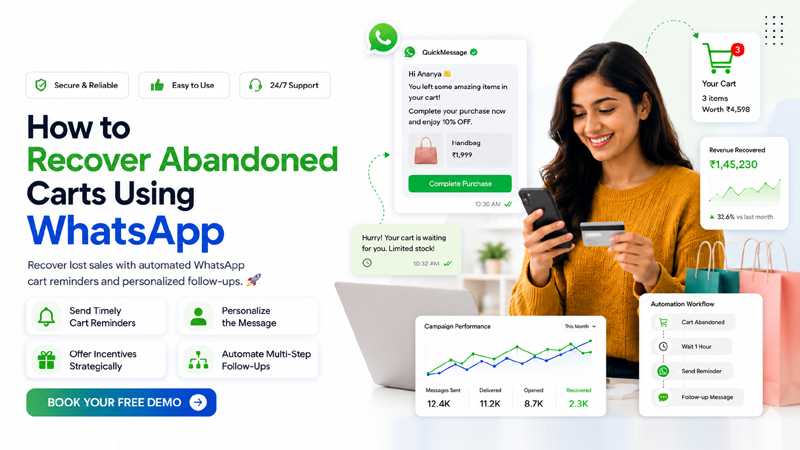
Why WhatsApp is Effective for Cart Recovery
For Indian businesses and global D2C brands alike, WhatsApp is no longer optional—it is the foundation of modern customer engagement. Here is why WhatsApp cart recovery consistently outperforms traditional email and SMS.
1. Unmatched Open & Click-Through Rates
While a great email campaign might achieve a 20% open rate and a 2% click-through rate (CTR), WhatsApp messages boast a staggering 98% open rate and average CTRs between 45% and 60%. When you send a cart recovery message on WhatsApp, you have near absolute certainty that the customer will see it.
2. Faster Response Rates
Cart recovery is highly time-sensitive. A customer who abandoned an hour ago is still "warm." Emails sit unread for days. WhatsApp messages are typically opened within the first three minutes, allowing you to strike while purchase intent is high.
3. Highly Personalized
Through WhatsApp CRM integration, your messages dynamically pull in the customer's name, the exact product they left behind, and a high-quality image. This visual reminder is incredibly persuasive.
4. Two-Way Engagement
Unlike static emails, the WhatsApp Business API allows for conversation. If they had a question about sizing or shipping, they can reply to your reminder. Your support team answers in real-time, removing friction and saving the sale.
5. Mobile-First Experience
E-commerce is overwhelmingly mobile, and WhatsApp is the native language of mobile users. Sending a recovery link that opens directly into a mobile-optimized checkout page creates a frictionless path to purchase.
How WhatsApp Cart Recovery Works
Implementing E-commerce WhatsApp Automation relies on integrating your storefront (like Shopify or WooCommerce) with a WhatsApp Business API provider. Here is the step-by-step background process:
Customer Adds Products to Cart
A shopper browses your store, selects an item, and proceeds to the checkout flow, entering their phone number and basic details.
Customer Leaves Without Checkout
The shopper exits the browser or abandons the session before processing the payment.
WhatsApp Automation Triggers
Your e-commerce platform detects the abandonment. After a pre-set delay (e.g., 30 minutes), it instantly sends a webhook to your WhatsApp API platform.
Reminder Message Sent
The API automatically dispatches a pre-approved WhatsApp template message containing the customer's name, the product details, and a direct checkout link.
Customer Returns to Checkout
The customer receives the notification, clicks the link, and is routed directly back to their pre-filled cart on their mobile device.
Purchase Completed
The customer finishes the transaction, the revenue is captured, and the automation sequence ends gracefully.
4 Proven WhatsApp Cart Recovery Strategies
To maximize your recovery rates, you need more than just a basic message. You need a strategy that blends timing, personalization, and psychological triggers.
Send Timely Cart Reminders
The timing of your intervention dictates its success. If you message too quickly, you might annoy a customer who was just fetching their credit card. If you wait too long, they may have already purchased from a competitor.
Personalize Every Message
Generic messages feel like spam. To utilize WhatsApp automation effectively, map your CRM variables to your WhatsApp templates.
- Always use the customer’s first name.
- Include the specific name of the product.
- Attach rich media (product images).
Offer Incentives Strategically
Price is a primary driver of abandonment. However, you should not give away your margins immediately. Use a staggered approach:
Automate Multi-Step Follow-Ups
A single message is good, but a multi-step sequence is better. Using a robust WhatsApp marketing software, you can build a workflow that acts autonomously.
Crucial Step: Ensure your workflow stops automatically if the user makes a purchase. Limit your sequence to a maximum of 2 to 3 messages to remain compliant and respectful of the user's inbox.
Sample WhatsApp Cart Recovery Messages
To use the WhatsApp Business API for proactive outreach, you must use pre-approved template messages. Here are five high-converting templates you can submit for approval and use in your campaigns.
{{1}}, {{2}}, etc.
1 The Helpful Reminder
⏱️ Send after 1 Hour{{1}}, we noticed you left something great in your cart! Did you run into any issues at checkout? Simply reply to this message if you need help, or click the link below to complete your order. 🛒{{2}}"
2 The FOMO / Urgency Approach
⏱️ Send after 4 Hours{{1}}, your cart is about to expire! ⏳ The {{2}} you selected is selling out fast. Complete your purchase now to guarantee your item before it's gone.Checkout here: {{3}}"
3 The Discount Incentive
⏱️ Send after 24 Hours{{1}}, still thinking about the {{2}}? We want to make your decision easier. Use code {{3}} at checkout for 10% off your entire order! Valid for the next 24 hours. 🎁Claim your discount here: {{4}}"
4 The Free Shipping Offer
🚚 Conditional Offer{{1}}! We've waived the shipping fees on your pending order. 🚚 Complete your purchase for {{2}} today and enjoy free, fast delivery on us.View your cart: {{3}}"
5 The Customer Support Approach
🎧 High-Value Carts{{1}}, this is {{2}} from the support team at {{3}}. I saw you were looking at our products but didn't check out. Do you have any questions about sizing, delivery, or returns? Reply here, and I'll be happy to help!"
Best Practices for WhatsApp Cart Recovery
Achieving high ROI with abandoned cart recovery WhatsApp campaigns requires strict adherence to best practices. Follow these rules to maximize conversions.
Secure Opt-Ins
Ensure your website's checkout process includes a clear opt-in checkbox for WhatsApp notifications. Sending messages to users who haven't consented violates Meta's policies and damages your brand.
Maintain Meta Compliance
Meta requires promotional and utility messages to be pre-approved templates. Ensure your templates adhere to their guidelines to avoid business account restrictions.
Optimize Your CTA
Use clear, action-oriented CTA buttons within your WhatsApp templates (e.g., "Complete Purchase"). Buttons drastically increase click-through rates compared to plain text links.
Respect Message Frequency
Do not bombard users. A sequence of two messages within 24 hours is the industry standard.
Use Segmentation
Treat a $10 cart differently than a $500 cart. Segment high-value abandoners and route their replies to a premium support team.
Common Mistakes to Avoid
Even the best-laid plans can fail if executed poorly. Avoid these critical mistakes when setting up your E-commerce WhatsApp automation:
Sending Too Many Messages
Spamming your customers will result in them blocking your number and reporting your business to Meta, which can lower your quality rating.
Forgetting to Halt the Automation
Nothing frustrates a customer more than receiving a "complete your purchase" message 10 minutes after they already bought the item. Ensure your CRM integration instantly stops the workflow upon a successful transaction.
Using Robotic Tone
Consumers use WhatsApp to talk to friends and family. Keep your brand tone conversational, friendly, and human.
Ignoring Replies
If you send a cart recovery message and a customer replies with a question, you must have a system (like a Shared Team Inbox) to answer them promptly.
Not Tracking Analytics
If you aren't tracking open rates, click rates, and recovered revenue, you cannot optimize your templates or your timing.
How QuickMessage Helps Recover Abandoned Carts
To execute these strategies flawlessly at scale, you need an enterprise-grade platform built for performance. QuickMessage is an Official Meta Business Partner providing the ultimate WhatsApp Business API India solution for growing D2C brands and e-commerce stores.
Official API Access
Get quick access to the API, seamless onboarding, and assistance in securing the coveted Green Tick verification to build trust.
Visual Automation
Set up complex, multi-tiered abandoned cart workflows in minutes. Trigger messages based on exact time delays without writing code.
CRM Integrations
Natively integrates with Shopify, WooCommerce, and custom CRMs. When an order is placed, the sequence stops automatically.
Shared Team Inbox
When a customer replies to an automated reminder with a query, your entire support team can access the chat and close the sale.
Advanced Analytics
Track exactly how much revenue your WhatsApp automations are generating. Monitor delivery rates, read receipts, and conversion metrics in a unified, easy-to-read dashboard.
Conclusion
Cart abandonment is an inevitable part of e-commerce, but losing those sales forever doesn't have to be. By shifting your recovery efforts from easily ignored emails to the high-engagement environment of WhatsApp, you can instantly recover lost revenue, lower your customer acquisition costs, and provide a superior, conversational shopping experience.
With the right timing, personalized incentives, and a powerful platform like QuickMessage handling the automation, your abandoned carts will transform from a source of frustration into a predictable, automated revenue stream.
Frequently Asked Questions (FAQs)
1. Can I automate WhatsApp cart recovery?
Yes. By integrating your e-commerce store with a WhatsApp Business API platform like QuickMessage, you can set up automated workflows that trigger messages exactly when a customer abandons their cart.
2. Is WhatsApp better than email for abandoned carts?
Absolutely. WhatsApp boasts an average open rate of 98% and click-through rates upwards of 45%. Traditional email open rates usually sit around 20%, making WhatsApp significantly more effective for time-sensitive recovery.
3. Do I need the WhatsApp Business API for cart recovery?
Yes. While the standard WhatsApp Business App allows for manual messaging, you cannot automate triggered messages, connect to your e-commerce CRM, or send messages at scale without the official WhatsApp Business API.
4. Is it legal to send WhatsApp cart reminders?
Yes, provided you comply with data privacy laws and Meta's policies. You must collect an active opt-in from the customer (usually via a checkbox at checkout) agreeing to receive WhatsApp notifications.
5. How many cart recovery messages should I send?
Best practices suggest sending a maximum of two to three messages. The first should be a helpful reminder sent within 1 hour. A second message, optionally including a discount or incentive, can be sent 24 hours later.
6. What are the costs associated with WhatsApp cart recovery?
Costs involve your WhatsApp marketing software subscription (like QuickMessage) and Meta’s conversation-based pricing. Meta charges a small fee per conversation, categorized by utility, marketing, or service conversations.
7. Can customers reply to automated cart recovery messages?
Yes! This is the biggest advantage of WhatsApp. If a customer replies to your automated reminder, the chat can be routed to a Shared Team Inbox where a human agent or a chatbot can assist them, drastically increasing the chances of a sale.
Recover More Sales with WhatsApp Business API
Automate abandoned cart recovery, engage customers instantly, and increase conversions with QuickMessage.
Book a Free Demo Talk to WhatsApp Experts

