WhatsApp Business API
E-commerce के लिए
Emails का open rate सिर्फ 20% होता है। WhatsApp का 98%। official WhatsApp Business API का उपयोग करके abandoned carts recover करें, RTOs कम करने के लिए COD verifications automate करें, और instant tracking alerts भेजें।
Walkthrough के लिए credit card की ज़रूरत नहीं। 24 घंटों के अंदर Live हो जाएं।
QuickMessage के उन merchants द्वारा रिपोर्ट किए गए नतीजों पर आधारित, जो cart recovery और COD verification workflows का उपयोग करते हैं।
E-commerce के लिए WhatsApp Business API क्या है?
E-commerce के लिए WhatsApp Business API, Meta के official messaging infrastructure का उपयोग करके एक online store और उसके customers के बीच होने वाली बातचीत को automate और scale करना है — order confirmations, shipping updates, cart-recovery nudges, cash-on-delivery (COD) verification, और post-purchase support — इन्हें email, SMS, या free WhatsApp Business App पर मौजूद एक अकेले agent के ज़रिए handle करने के बजाय।
Free WhatsApp Business App के विपरीत, जो एक device और manually reply करने वाले एक व्यक्ति के लिए बनाया गया है, official API आपके store के backend (Shopify, कोई custom cart, या REST API के ज़रिए कोई भी system) से जुड़ता है और automated workflows, chatbots, और एक shared team inbox को एक साथ हज़ारों conversations handle करने देता है — यह सब Meta के official, policy-compliant messaging infrastructure के दायरे में रहते हुए होता है, किसी unofficial या modded tool से नहीं।
किसी भारतीय D2C brand के लिए, इसका मतलब आम तौर पर तीन चीज़ों का एक साथ काम करना होता है: automated transactional messages जो order और delivery updates के लिए SMS और email की जगह लेते हैं, opted-in customers को sales और restocks के लिए marketing broadcasts, और COD-specific automation — order confirmation और cancellation flows — जो सीधे भारतीय e-commerce की सबसे बड़ी cost centers में से एक को target करता है: cash-on-delivery orders पर Return to Origin (RTO)।
"WhatsApp Business API" और "WhatsApp Business App" को shoppers अक्सर एक जैसा मान लेते हैं, लेकिन बढ़ते हुए store के लिए यह फ़र्क़ मायने रखता है: App एक free, single-device tool है जो हाथ से reply करने वाले एक मालिक के लिए है, जबकि API एक paid infrastructure है जिसे automate किया जाना है, पूरी team में share किया जाना है, और आपके store को चलाने वाले systems से जोड़ा जाना है। दोनों में से चुनना आम तौर पर order volume पर निर्भर करता है — एक बार जब manual replies और एक अकेला phone आपको धीमा करने लगे, तो API वही है जो support और marketing को business के साथ साथ बढ़ने देता है, बजाय इसके कि वे ही एक bottleneck बन जाएं।
हर भारतीय D2C Store को किन Communication Problems का सामना करना पड़ता है
Cart abandonment अपवाद नहीं, बल्कि आम बात है
ज़्यादातर visitors जो किसी product को cart में add करते हैं, कभी checkout पूरा नहीं करते — वे distract हो जाते हैं, किसी दूसरे tab में price compare करते हैं, या बस भूल जाते हैं। एक email reminder एक भरे हुए, कम ही खुलने वाले inbox से मुक़ाबला करता है। एक WhatsApp reminder उसी app में पहुँचता है जिसे customer दिन में दर्जनों बार पहले से check करता है, साथ में checkout link और वापस आने की एक वजह (एक discount code, stock की चेतावनी) एक tap की दूरी पर।
COD orders के साथ एक छुपी हुई logistics cost जुड़ी होती है
ज़्यादातर भारतीय D2C brands के लिए cash-on-delivery अब भी orders का एक बड़ा हिस्सा है, और हर वह COD order जो origin पर वापस (RTO) आता है, उस पर वही shipping, packaging, और handling fees लगती हैं जो deliver हुए order पर लगती हैं — बिना उसके revenue के। dispatch से पहले एक quick WhatsApp confirmation एक अंदाज़े ("वे probably ले लेंगे") को customer के खुद लिए गए फ़ैसले में बदल देता है, जो RTO के ख़िलाफ़ ज़्यादातर stores के पास मौजूद सबसे बड़ा lever है।
"मेरा order कहाँ है?" आपके support inbox को भर देता है
proactive tracking updates के बिना, post-purchase support tickets का एक बड़ा हिस्सा सिर्फ customers द्वारा उस status के बारे में पूछना होता है जो आपका system पहले से जानता है। वही information automatically push करना — dispatch पर, out-for-delivery पर, और delivery पर — ticket को बनने से पहले ही हटा देता है, जिससे आपकी support team उन सवालों के लिए खाली रहती है जिन्हें वाकई एक इंसान की ज़रूरत है।
Generic marketing को ignore किया जाता है — या इससे भी बुरा, आप block हो जाते हैं
एक broadcast जो पाने वाले के लिए relevant नहीं है, वह सिर्फ convert करने में fail नहीं होता; WhatsApp पर, उसे spam के तौर पर mark किया जा सकता है, जो आपके account की messaging quality rating को असर करता है। अपनी audience को segment करना — purchase history, cart activity, या product interest के हिसाब से — और कम लेकिन ज़्यादा relevant messages भेजना, पूरी list को हर offer से blast करने से लगातार बेहतर नतीजे देता है।
Support tools आपस में बात नहीं करते
Order data आपके store में रहता है, conversations WhatsApp में रहती हैं, tickets एक helpdesk में रहते हैं, और campaigns एक email tool में रहते हैं — इसलिए agents tabs बदलने में समय बर्बाद करते हैं और customers को बार-बार अपनी बात दोहरानी पड़ती है। Order status, conversation history, और campaign activity को एक Shared Team Inbox में लाना ही WhatsApp को "एक और channel check करना" से आपकी मुख्य support और sales surface में बदल देता है।
पूरी Shopping Journey को Automate करें
QuickMessage बिखरे हुए email tools और SMS gateways की जगह एक ही powerful WhatsApp Business API platform देता है — पहले cart addition से लेकर post-delivery review तक।
Abandoned Cart Recovery
Cart abandon होने के थोड़ी देर बाद एक direct checkout link और एक exclusive discount code के साथ automatically WhatsApp message trigger करें। क्योंकि message उस app में पहुँचता है जो customer पहले से खोल चुका है, recovery rates आम तौर पर बराबर के email reminder से कहीं ज़्यादा होती हैं — और email की तरह नहीं, आप भेजे गए हर message पर delivery और read status देख सकते हैं।
COD Order Verification
Return to Origin (RTO) से लड़ें, जो भारतीय D2C brands के लिए सबसे costly problems में से एक है। हर COD customer को ship होने से पहले एक tap में अपना order confirm या cancel करने के लिए automated message भेजें — fake, ग़लती से बने, या अचानक मन बदल गए orders को logistics पर पैसे खर्च करने से पहले पकड़ें, बाद में नहीं।
Automated Order Tracking
Buyers को informed रखें और "मेरा order कहाँ है?" जैसे support tickets कम करें। Order confirm, dispatch, out for delivery, और deliver होने के तुरंत बाद transactional updates भेजें — हर एक एक Meta-approved template है, कोई free-form message नहीं जिसके 24-घंटे की window से बाहर जाने का risk हो।
Festive Marketing Broadcasts
दिवाली, होली, या flash-sale campaigns सीधे WhatsApp पर चलाएं। अपनी opted-in customer list को rich media catalogs, images, और offer codes safely broadcast करें, pre-approved Meta templates का उपयोग करके, ताकि आपका account सबसे ज़्यादा sale वाले दिनों में भी अच्छी स्थिति में बना रहे।
Pre-Purchase Support Bot
Product sizing के सवालों का जवाब देने, customer के जवाबों के आधार पर products recommend करने, और hesitant shoppers को वापस checkout की ओर guide करने के लिए एक 24/7 no-code chatbot deploy करें — बार-बार आने वाले सवालों को automatically handle करके, ताकि आपके human agents सिर्फ उन conversations पर focus करें जिन्हें वाकई एक इंसान की ज़रूरत है।
Feedback & Reviews
Delivery के कुछ दिन बाद एक product review या rating माँगने वाला message automatically trigger करें। यह एक छोटा सा nudge है जो तब पहुँचता है जब product अब भी customer के दिमाग़ में ताज़ा होता है, और यह धीरे-धीरे on-site social proof बनाता है जो अगले hesitant buyer को convince करता है।
आपके Store के लिए WhatsApp API कैसे काम करता है
किसी product के cart में आने से लेकर delivery के बाद की review तक, QuickMessage आपके store से connect होने के बाद यह सब automatically चलता है।
| Step | क्या होता है | Customer WhatsApp पर क्या देखता है |
|---|---|---|
| 1. Cart Activity | Customer आपके Shopify या custom store पर items cart में add करता है, फिर checkout पूरा किए बिना चला जाता है। | एक direct checkout link वाला और, चाहें तो, एक discount code वाला reminder message। |
| 2. Order Placed | Checkout पूरा होता है और order automatically store integration या API के ज़रिए QuickMessage से sync हो जाता है। | Order number और item summary के साथ एक instant order confirmation template। |
| 3. COD Verification | Cash-on-delivery orders के लिए, एक verification workflow item ship होने से पहले customer से confirm करने के लिए कहता है। | एक-tap वाला "Confirm Order" / "Cancel Order" button message। |
| 4. Dispatch & Tracking | Order pack होकर आपके courier partner को सौंपा जाता है; status updates automatically वापस flow होते हैं। | Dispatch alert, फिर tracking link के साथ एक out-for-delivery message। |
| 5. Delivery | Courier order को delivered mark करता है; QuickMessage इसे customer की conversation history में log करता है। | एक delivery confirmation, साथ में order में कुछ ग़लत होने पर support link। |
| 6. Feedback | Delivery के कुछ समय बाद, एक review-request workflow automatically fire होता है। | एक direct link के साथ rating या review के लिए एक friendly request। |
ऊपर दिया गया हर step Meta-approved message templates का उपयोग करता है, और पहली cart reminder से post-delivery review तक की हर conversation पूरी history के साथ आपके QuickMessage Shared Team Inbox में पहुँचती है।
WhatsApp को सिर्फ एक Support Line नहीं, बल्कि एक Revenue Channel बनाना
एक बार जब customer opt-in कर चुका हो और order place कर चुका हो, तो WhatsApp upselling और cross-selling के लिए आपके पास मौजूद सबसे ज़्यादा attention वाले channels में से एक बन जाता है — बस इसे कम और relevant तरीके से इस्तेमाल किया जाना चाहिए। किसी phone case की confirmation message एक screen protector suggest करने की सही जगह है; एक shipping update किसी unrelated sale की जगह नहीं है। QuickMessage आपको post-purchase journey के specific points पर एक relevant product suggestion, एक limited-time bundle offer, या एक "complete the look" catalog link जोड़ने देता है, बजाय इसके कि हर customer को वही generic promotion भेजा जाए।
यही principle purchase से पहले के browse और cart behavior पर भी लागू होता है: जिस customer ने किसी product को दो sizes में देखा लेकिन ख़रीदा नहीं, उसे stock या size-availability message से nudge किया जा सकता है; जिस customer ने एक बार ख़रीदा है, उसे उस product category के typical repurchase window के आस-पास फिर से engage किया जा सकता है। इसके लिए किसी developer को शुरू से कुछ बनाने की ज़रूरत नहीं — यह एक बार Flow Builder में configure होता है और फिर trigger से match करने वाले हर customer के लिए automatically चलता है।
Post-Purchase Engagement जो Repeat Customers बनाता है
एक नए D2C customer को acquire करना आम तौर पर किसी मौजूदा customer को बनाए रखने से कहीं ज़्यादा costly होता है, जिससे पहली purchase के बाद के हफ़्ते पूरे relationship के सबसे valuable समय में से बन जाते हैं। Checkout के ठीक बाद एक छोटा सा "thank you और आगे क्या होगा" message expectations set करता है और anxiety की वजह से बनने वाले support tickets कम करता है। एक clear support link वाली delivery confirmation problems को पकड़ लेती है — ग़लत size, damaged item — इससे पहले कि customer हार मानकर आपसे contact करने के बजाय एक negative review छोड़ दे।
कुछ दिन बाद, एक review request feedback capture करता है जब product अभी भी customer के दिमाग़ में ताज़ा है, और सही समय पर भेजा गया restock या replenishment reminder — जो किसी consumable product के ख़त्म होने के समय के हिसाब से timed हो — customer को आपके बारे में सोचने का इंतज़ार किए बिना वापस आपके store पर ला देता है। हाथ से किया गया, इस तरह का sequencing हज़ारों orders पर consistently चलाना almost impossible है; QuickMessage के Flow Builder से automated होकर, यह हर customer के लिए, हर बार एक जैसा चलता है।
आपके Tech Stack से Connect होता है
Shopify store के लिए किसी complex coding की ज़रूरत नहीं। किसी दूसरे platform पर हैं? हमारा REST API और webhooks ज़्यादातर custom-built stores से भी connect होते हैं।
WooCommerce, Magento, या किसी दूसरे platform पर build कर रहे हैं? हमारी team से बात करें — ज़्यादातर custom setups हमारे REST API के ज़रिए कुछ ही दिनों में connect हो सकते हैं।
Setup वाकई में कैसा दिखता है
ज़्यादातर merchants को लगता है कि "official WhatsApp API" का मतलब कुछ भी live होने से पहले एक लंबा developer project है। एक Shopify store के लिए, आम तौर पर ऐसा नहीं होता। आपके store को connect करना, Meta के साथ अपना WhatsApp Business number verify करना, और अपना पहला template — आम तौर पर order confirmation — approve करवाना ही ज़्यादातर काम है, और QuickMessage की team इस process के Meta-facing हिस्सों को खुद handle करती है, बजाय इसके कि आपको Meta के dashboards में अकेला छोड़ दिया जाए।
Number verify हो जाने के बाद, plug-and-play Shopify integration orders को automatically sync करता है, और built-in template library आपको order confirmations, shipping updates, और abandoned-cart messages के लिए एक starting point देती है जो पहले से Meta की approval requirements से match करती है, बजाय इसके कि आपको एक blank page से templates draft करने पड़ें। इसके बाद, COD verification workflow, Flow Builder automations, और Shared Team Inbox को on करना dashboard के अंदर बस configuration की बात है, कोई custom engineering नहीं।
Shopify के बजाय किसी custom-built platform पर मौजूद stores के लिए, वही order और customer events QuickMessage के REST API और webhooks के ज़रिए connect होते हैं — आपका developer एक बार आपके store के order-status events को QuickMessage के messaging triggers से map करता है, और फिर वही automated journeys वहाँ से चलती रहती हैं। किसी भी तरह से, ज़्यादातर merchants का पहला automated workflow — आम तौर पर abandoned cart recovery या order confirmation — integration शुरू करने के एक दिन के भीतर live हो जाता है, जो QuickMessage के अपने सभी customers के लिए targeted 24-घंटे की onboarding window से काफ़ी पहले है।
D2C Brands क्यों
QuickMessage चुनते हैं।
हम सिर्फ़ एक Wati alternative नहीं हैं; हम उन भारतीय e-commerce brands के लिए एक dedicated growth partner हैं जो high order volumes और tight margins के साथ काम कर रहे हैं।
QuickMessage को भारतीय sellers की specific communication problems को ध्यान में रखकर बनाया गया है — heavy COD volumes, festival-driven demand spikes, और वे support teams जिन्हें conversation history खोए बिना तेज़ी से move करना होता है। यही वजह है कि D2C brands उन generic messaging tools के बजाय लगातार QuickMessage चुनते हैं जो मुख्य रूप से एक global, card-payment-first market के लिए बनाए गए हैं।
-
Official, Policy-Compliant API: क्योंकि आप official WhatsApp Business API पर हैं, आपकी opted-in list को भेजे गए marketing broadcasts Meta के नियमों के दायरे में रहते हैं — किसी unofficial tool के ज़रिए नहीं, जिससे आपका number ban होने का risk रहता है।
-
Interactive Product Catalogs: Customers को WhatsApp chat window के अंदर ही, बिना conversation छोड़े, आपका catalog browse करने और products को cart में add करने दें।
-
Official Blue Tick: उन first-time buyers का भरोसा जीतें जो अभी आपका number नहीं पहचानते। हम आपके D2C brand के लिए Meta verification process में सहायता करते हैं — approval Meta के अपने criteria के अधीन है।
-
साफ़ Per-Message Rates: हर per-message rate पहले से लिखा है, साथ में ₹999 से शुरू होने वाली एक सीधी-सादी monthly platform fee।
-
Shared Team Inbox: आपकी support, sales, और operations team सभी एक ही WhatsApp number पर काम कर सकती हैं, जहाँ conversations assign, tag, और track होती हैं — किसी एक व्यक्ति के phone में दबने के बजाय।
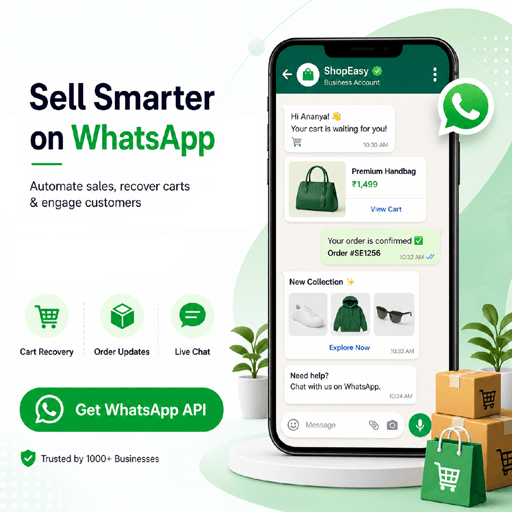
E-commerce के लिए WhatsApp API बनाम Email & SMS
ज़्यादातर stores रातों-रात email और SMS की जगह नहीं लेते — लेकिन cart recovery और COD confirmation जैसे time-sensitive, high-value messages के लिए, channel से एक measurable फ़र्क़ पड़ता है।
| Factor | SMS | WhatsApp API | |
|---|---|---|---|
| Typical open rate | ~20% | ~90% (opened, ज़रूरी नहीं कि पढ़ा गया हो) | ~98% |
| Rich media (images, catalogs, buttons) | Limited | सिर्फ़ Text | हाँ |
| Two-way conversation | धीमी, thread-based | Practical नहीं | Real-time chat |
| One-tap COD confirmation | नहीं | नहीं | हाँ (button reply) |
| हर message पर Delivery & Read status | सिर्फ़ delivery, अविश्वसनीय | सिर्फ़ delivery | Sent, delivered, और read |
Open-rate के ये figures e-commerce messaging के लिए सामान्य रूप से बताए जाने वाले industry benchmarks हैं, कोई audited QuickMessage-specific averages नहीं।
Live होने के बाद जो Metrics मायने रखते हैं
QuickMessage में हर campaign और workflow इन numbers पर report करता है, ताकि आप देख सकें कि असल में revenue को क्या move कर रहा है — सिर्फ़ यह नहीं कि क्या भेजा गया।
Cart Recovery Rate
Abandoned-cart messages का कितना हिस्सा वापस एक completed order की ओर ले जाता है — यही आपके cart-recovery flow के लिए core metric है।
RTO Rate
Dispatch से पहले या बाद origin पर वापस आने वाले COD orders का percentage — वह number जिसे आपके COD verification workflow को समय के साथ नीचे लाना चाहिए।
Message Delivery & Read Rate
Sent बनाम delivered बनाम read, हर template के हिसाब से अलग — इससे किसी fail होते template या data-quality issue को जल्दी पकड़ने में मदद मिलती है।
First Response Time
आपके Shared Team Inbox agents (या आपका bot) किसी inbound customer message का कितनी जल्दी जवाब देते हैं — pre-purchase सवालों के लिए conversion का एक direct driver।
Broadcast Click-Through Rate
किसी marketing broadcast पाने वालों का कितना हिस्सा आपके store या catalog पर tap through करता है — वह number जो बताता है कि कोई campaign असल में काम कर रही है या नहीं।
Review Collection Rate
Post-delivery review requests में से कितने असल review में convert होते हैं — social proof का एक धीरे-धीरे बढ़ने वाला लेकिन compounding source।
बेहतर Campaign नतीजों के लिए अपनी Audience को Segment करना
एक convert होने वाले WhatsApp broadcast और एक ignore हो जाने वाले broadcast के बीच सबसे बड़ा फ़र्क़ यही है कि वह उसे पाने वाले व्यक्ति के लिए relevant है या नहीं। हर customer को वही "Flat 20% Off" message भेज देना — चाहे उन्होंने जो भी ख़रीदा हो, browse किया हो, या ignore किया हो — आपकी block rate बढ़ाने और WhatsApp द्वारा दी गई attention बर्बाद करने का सबसे तेज़ तरीका है। QuickMessage का Contacts module आपको असली store behavior से lists बनाने देता है — जिन customers ने किसी specific category में ख़रीदा हो, जिन्होंने पिछले हफ़्ते cart abandon किया हो, जिन्होंने 60 दिनों से order नहीं किया हो — ताकि हर campaign सिर्फ़ उन लोगों तक पहुँचे जिनके लिए वह असल में relevant है।
यह बात festive sale जैसे high-volume periods में और भी ज़्यादा मायने रखती है, जब पूरी list को एक साथ blast करने का मन करता है। जो customers sale पर मौजूद उस exact category में interest दिखा चुके हैं, उन्हें भेजी गई एक छोटी, well-targeted campaign आम तौर पर सबको भेजे गए एक single broadcast से बेहतर perform करती है — और यह बाद में आने वाले campaigns के लिए भी आपके account की messaging quality rating को healthy रखता है। Tags, lists, और custom attributes (favorite category, average order value, last purchase date) को manually set किया जा सकता है, आपके CRM से sync किया जा सकता है, या customers के आपके brand के साथ interact करने पर store events से automatically push किया जा सकता है।
E-commerce WhatsApp Messaging के लिए Best Practices
कुछ आदतें उन stores को अलग करती हैं जिन्हें strong, lasting नतीजे मिलते हैं, उनसे जिनका account flag हो जाता है।
Marketing messages से पहले explicit opt-in लें
Checkout पर एक checkbox या एक keyword reply काफ़ी है — लेकिन marketing broadcasts सिर्फ़ उन customers को जाने चाहिए जिन्होंने उन्हें पाने के लिए actively सहमति दी हो। Transactional messages (order, shipping updates) को वही opt-in नहीं चाहिए, क्योंकि वे customer की पहले से की गई purchase से जुड़े होते हैं।
Transactional और Marketing templates को अलग रखें
Meta templates को Marketing, Utility, या Authentication में categorize करता है, और हर एक का billing और rate-limit अलग होता है। किसी order-confirmation template में promotional offer मिला देने पर template reject या miscategorize होने का risk रहता है।
Customer के नाम से आगे बढ़कर Personalize करें
Cart में छूटे असली product, असली order number, या specific delivery date का ज़िक्र करें। Generic broadcast copy कम अच्छा perform करती है और recipients द्वारा spam के तौर पर mark होने की संभावना ज़्यादा होती है।
Bot automation और human handoff के बीच balance बनाएं
Chatbot को sizing के सवाल और order status handle करने दें, लेकिन किसी frustrated या confused customer के लिए अपनी बात दोहराए बिना आपके Shared Team Inbox में किसी असली agent तक पहुँचना आसान रखें।
अपनी Account Quality Rating पर नज़र रखें
Meta block rates, complaint rates, और template quality track करता है। इसमें गिरावट आपके account को एक lower messaging tier में डाल देती है — इसलिए सिर्फ़ message volume से ज़्यादा मायने एक clean opt-in list और relevant messaging रखते हैं।
अपना Analytics हर हफ़्ते देखें, सिर्फ़ campaign के बाद नहीं
RTO और cart-recovery rates season, आपके product mix, और आपके courier partner की performance के साथ बदलते रहते हैं। एक weekly check किसी problem को उसके छोटे रहते ही पकड़ लेता है।
भारत में WhatsApp Commerce किस दिशा में जा रहा है
WhatsApp भारत में पहले से ही एक बड़े margin से सबसे ज़्यादा इस्तेमाल होने वाला messaging app है, और Meta ने लगातार commerce features जोड़े हैं — product catalogs, in-chat carts, और payment-linked messages — जिनका मक़सद "किसी brand से chat करना" और "किसी brand से ख़रीदना" के बीच के फ़र्क़ को बिना conversation छोड़े मिटाना है। D2C stores के लिए, यह रुझान बताता है कि WhatsApp धीरे-धीरे एक मौजूदा store पर जोड़ी गई notification channel से ज़्यादा अपना एक storefront बन जाएगा, ख़ासकर उन repeat customers के लिए जो brand पर पहले से भरोसा करते हैं।
जो stores अभी से strong WhatsApp habits बनाते हैं — clean opt-in lists, relevant segmentation, एक Shared Team Inbox जो support को तेज़ बनाए रखे — वे Meta के हर नए capability को rollout होने पर अपनाने के लिए बेहतर स्थिति में होते हैं, बजाय इसके कि बाद में शुरू से शुरू करना पड़े। आगे चाहे कोई भी specific features आएं, असली फ़ायदा वही रहता है: email या SMS से कहीं ज़्यादा attention वाला एक channel, जो सीधे उन tools से जुड़ा है जिन्हें आपकी team पहले से store चलाने के लिए इस्तेमाल करती है।
E-commerce WhatsApp API
अक्सर पूछे जाने वाले सवाल।
Shopify से connect करना कितना मुश्किल है?
बहुत आसान। हम एक direct plug-and-play Shopify integration देते हैं। आप 15 मिनट से भी कम समय में अपने store पर abandoned cart और order tracking automations चला सकते हैं।
क्या WhatsApp automation वाकई RTO कम करता है?
Automated COD verification — dispatch से पहले customer से confirm करने के लिए कहना — ख़ास तौर पर उन orders को पकड़ने के लिए design किया गया है जो वरना origin पर वापस आ जाते। अपनी category के लिए current merchant-reported RTO improvement figures हमारी team से पूछें।
क्या कई agents customer queries handle कर सकते हैं?
हाँ। हमारा Shared Team Inbox आपकी पूरी support team को एक ही WhatsApp number पर साथ काम करने देता है, जहाँ conversations assign, tag, और internal notes के साथ track होती हैं।
क्या official API पर bulk marketing allowed है?
हाँ। Free app के विपरीत, official API आपको pre-approved Meta templates का उपयोग करके opted-in customers को bulk promotional messages — discount codes, catalogs, sale announcements — भेजने देता है।
क्या WhatsApp API COD order confirmation support करता है?
हाँ — यह हमारे सबसे ज़्यादा इस्तेमाल होने वाले e-commerce workflows में से एक है। COD order ship होने से पहले customers को एक-tap वाला "Confirm" / "Cancel" message मिलता है, ताकि आप logistics पर पैसे खर्च करने से पहले cancellations पकड़ सकें।
किसी store के लिए WhatsApp API pricing कैसे calculate होती है?
दो हिस्से: dashboard, inbox, और automation tools के लिए एक QuickMessage platform plan (₹999/month से शुरू), और भेजे गए messages के per-message charges, जो अलग से bill होते हैं। पूरी plan details के लिए हमारा pricing page देखें।
क्या e-commerce के लिए WhatsApp API email से बेहतर है?
दोनों अलग-अलग मक़सद पूरे करते हैं। WhatsApp पर आम तौर पर open और read rates कहीं ज़्यादा होती हैं और यह two-way, real-time conversation और one-tap actions support करता है — यही वजह है कि ज़्यादातर stores इसे cart recovery और COD confirmation जैसे time-sensitive messages के लिए इस्तेमाल करते हैं, जबकि email को newsletters और receipts के लिए रखते हैं।
क्या मैं अपना number खोए बिना किसी दूसरे WhatsApp provider से migrate कर सकता हूँ?
हाँ, ज़्यादातर मामलों में आपका मौजूदा WhatsApp Business number और message history QuickMessage में migrate किया जा सकता है। switch करने से पहले अपने specific setup के बारे में हमारी team से बात करें।
क्या मैं अलग-अलग campaigns के लिए customers को segment कर सकता हूँ?
हाँ। Purchase history, cart activity, product interest, या अपने CRM या store से sync किए गए custom attributes से lists बनाएं, और हर campaign को सिर्फ़ उन customers तक पहुँचाएं जिनके लिए वह असल में relevant है, न कि सबको एक साथ broadcast करें।
क्या marketing broadcasts भेजने से मेरा WhatsApp number ban हो जाएगा?
किसी unofficial tool के ज़रिए unsolicited bulk messages भेजने में असली ban का risk होता है। Official API पर, opted-in recipients और Meta-approved templates के साथ, Meta की messaging policies का पालन करने पर यह risk minimal रहता है — हालाँकि कोई भी provider किसी specific account के नतीजे की guarantee नहीं दे सकता।
Sales खोना बंद करें। Scale करना शुरू करें।
सबसे बेहतरीन D2C Brands से जुड़ें।
Abandoned carts को revenue में बदलें, COD orders पर RTO कम करें, और official WhatsApp Business API पर QuickMessage के साथ अपना पूरा e-commerce funnel automate करें।