

Streamline user logins and account registrations with fast, reliable code delivery. Leverage the official WhatsApp Business API to send secure, template-based verification codes instantly to your customers worldwide.
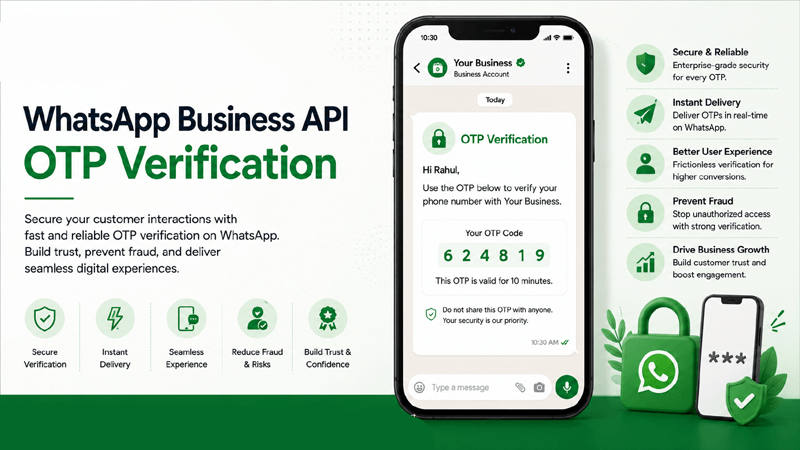
What is WhatsApp Business API OTP Verification?
Discover how modern enterprises utilize secure verification flows through the WhatsApp Business API to authenticate users efficiently and accurately.
Core Definition
WhatsApp Business API OTP Verification is the programmatic process of generating and sending a One-Time Password directly to a user's WhatsApp account. It replaces or complements traditional SMS authentication channels for identity verification.
How Authentication Works
When a user requests login or registration on your platform, your backend connects with QuickMessage. An authentication request triggers a pre-approved utility template carrying the unique code straight to the user's chat interface.
Primary Use Cases
Businesses apply WhatsApp OTP Verification across critical touchpoints: login verification, account creation, password resets, sensitive financial transaction approvals, and new device authorizations.
Why WhatsApp OTP Verification Matters
Upgrading authentication workflows with the WhatsApp Business API offers distinct operational and user-experience advantages for modern applications.
Faster Authentication
Optimized routing structures ensure verification codes arrive promptly, letting users complete authentication and access services without frustration.
Improved Experience
Users frequently keep WhatsApp active, making it convenient to read incoming verification messages without switching between separate text applications.
Reduced SMS Dependency
Diversifying your authentication strategy away from traditional SMS gateways helps mitigate fluctuating carrier routing fees and delivery anomalies.
Secure Verification
Leverage end-to-end encrypted messaging channels combined with dynamic template variables to ensure code integrity and user identity confirmation.
Global Reach
Support international user bases seamlessly by reaching active phone numbers across multiple countries through a standardized API architecture.
Reliable Communication
Built on robust infrastructure, ensuring that high-volume OTP traffic during peak login times is handled systematically and transparently.
Lower Friction
Minimize login abandonment rates caused by delayed codes, giving users a smooth, reliable verification pathway every single time.
Verified Business ID
Send authentication codes from a verified green-badge business profile, establishing immediate authenticity and building user trust.
Enterprise OTP Features & Capabilities
Explore the comprehensive suite of tools built into QuickMessage to optimize your WhatsApp Business API authentication workflows.
Instant OTP Delivery
Trigger high-speed code dispatches programmatically to minimize user waiting periods during authentication.
Secure Authentication
Protect user accounts using encrypted messaging infrastructure compliant with rigorous enterprise standards.
Login Verification
Authenticate user access seamlessly when they sign into web applications, mobile apps, or customer portals.
Account Registration
Verify new user phone numbers instantly during sign-up to prevent spam accounts and fake user registrations.
Password Reset OTP
Safeguard account recovery paths by sending secure verification tokens for password reset requests.
Transaction Verification
Authorize high-value transfers, checkout actions, or profile changes with secondary confirmation codes.
Device Verification
Authenticate new login devices or unrecognized IP locations with extra security prompts.
Template-based Messages
Utilize pre-approved utility message Templates designed specifically for fast code delivery.
Dynamic Variables
Insert unique numbers, expiration timers, and user names dynamically into every verification message.
Flow Builder Automation
Design automated post-verification onboarding loops using our visual Flow Builder.
CRM Integration
Sync verification logs and user states back to your database via robust CRM Integrations.
Campaign Management
Manage security broadcast announcements or system updates using Campaign Management tools.
Analytics & Reports
Track delivery success rates and authentication latency metrics through detailed Analytics & Reports.
Shared Team Inbox
Handle user authentication support tickets collaboratively inside the Shared Team Inbox.
Enterprise-grade Security
Protect sensitive user communications with strict data privacy protocols and robust infrastructure controls.
How WhatsApp OTP Verification Works
A clear step-by-step breakdown of how authentication requests flow from your user interface to the WhatsApp Business API gateway.
User Initiates Login or Registration
The user enters their phone number on your application's sign-in screen or registration portal, requesting access to their account.
Generate One-Time Password
Your backend server securely generates a unique, time-sensitive verification code and timestamps its validity window.
Send OTP via WhatsApp Business API
Your server invokes QuickMessage’s API to dispatch the pre-approved template message carrying the OTP straight to the user's WhatsApp account.
User Enters Verification Code
The user reads the incoming WhatsApp message, copies or recalls the code, and inputs it back into your application's verification prompt field.
Validate OTP
Your system verifies the submitted code against the generated token and checks that the expiration timestamp has not been exceeded.
Grant Secure Access
Upon successful code validation, your application authenticates the session, granting the user immediate entry to their dashboard or profile.
Business and Customer Advantages
Explore how integrating secure WhatsApp verification code workflows delivers mutual value for both enterprise organizations and their end users.
Business Benefits
- Faster Authentication: Optimize login pathways to reduce user drop-offs during high-traffic registration events.
- Reduced Verification Delays: Minimize support tickets related to missing SMS verification codes.
- Improved Operational Efficiency: Automate the entire code generation and validation loop without manual intervention.
Customer Benefits
- Better Customer Experience: Receive authentication codes inside a familiar messaging application instantly.
- Secure Account Access: Protect personal data and profiles with reliable multi-factor authentication steps.
- Automated Workflows: Enjoy smooth, instantaneous verification interactions across web and mobile devices.
Industry Use Cases for WhatsApp Authentication
See how organizations across highly regulated and fast-paced sectors deploy secure OTP verification via WhatsApp.
Banking
Authenticate online banking logins and secondary user requests.
Financial Services
Verify client portfolio access and secure document portals.
FinTech
Authorize peer-to-peer transfers and digital wallet registrations.
Insurance
Verify policyholder sign-ins and claims portal access securely.
Healthcare
Authenticate patient record portal logins and appointment bookings.
Ecommerce
Protect customer checkout logins and account profile modifications.
Retail
Verify loyalty program account access and reward redemption codes.
Travel
Authenticate user bookings, ticketing profiles, and member accounts.
Education
Secure student portal logins and online examination submissions.
Telecommunications
Verify user identities for self-care app logins and plan changes.
Government Services
Authenticate citizen portal access for official public document retrieval.
SaaS Platforms
Secure multi-tenant workspace logins and administrative controls.
The Enterprise WhatsApp Platform
Partner with an Official Meta Business Tech Partner to manage your authentication traffic with enterprise reliability.
Official Meta Business Tech Partner
Maintain strict compliance and high reliability directly aligned with Meta platform guidelines.
Official WhatsApp BSP
Access direct infrastructure provisioning for the WhatsApp Business API.
Official API Platform
Deploy robust REST APIs designed specifically for high-frequency transactional and utility message delivery.
Campaign Management
Manage broadcast alerts and system notifications effectively using Campaign Management tools.
Flow Builder
Construct post-verification user journeys visually using our drag-and-drop Flow Builder.
CRM Integration
Sync user verification logs and profile states with robust CRM Integrations.
Shared Team Inbox
Resolve authentication support requests collaboratively via our Shared Team Inbox.
Media Library
Store brand assets, security badges, and verification UI elements safely in your Media Library.
Analytics & Reports
Monitor delivery latencies and traffic volumes through detailed Analytics & Reports.
Enterprise-grade Security
Protect sensitive verification data using encrypted architecture and strict security controls.
Dedicated Support
Rely on expert technical assistance and onboarding specialists to keep your authentication uptime flawless.
Frequently Asked Questions
Find answers to common questions regarding WhatsApp Business API OTP Verification setup, security best practices, and API integration requirements.
1. What is WhatsApp Business API OTP Verification?
WhatsApp Business API OTP Verification is the programmatic process of generating and sending a One-Time Password directly to a user's WhatsApp account for identity confirmation. By utilizing the official WhatsApp Business API, enterprise businesses can trigger authentication codes securely and rapidly. This method provides an alternative or supplement to traditional SMS, offering a familiar interface for users checking their verification tokens while ensuring reliable message dispatch across global networks.
2. How does WhatsApp OTP authentication work technically?
The authentication process relies on API integration between your application backend and QuickMessage. When a user requests login or registration, your server generates a secure token and calls our API endpoint. QuickMessage formats this data into a pre-approved utility message Template and dispatches it via the WhatsApp gateway. Once the user enters the code back into your platform, your server validates the token against the original generated value to grant access.
3. Are WhatsApp verification codes suitable for secure logins?
Yes. Verification codes sent via WhatsApp leverage the platform's encrypted messaging architecture to protect data in transit. While no single authentication channel is foolproof against every theoretical cyber threat, WhatsApp OTP verification provides a robust layer of multi-factor authentication. Paired with proper backend session management and expiration timers, it serves as a dependable tool for securing user accounts, preventing unauthorized logins, and verifying new registrations.
4. What type of message template is required for OTPs?
According to Meta's platform guidelines, authentication codes and verification messages must be submitted under the "Utility" template category. These templates allow for dynamic variables, such as inserting the numerical code and an expiration time into a standardized text layout. QuickMessage provides an intuitive template management dashboard where you can draft your authentication templates and submit them to Meta for rapid approval before going live in production.
5. Can we automate password reset verification codes?
Absolutely. Password reset requests represent a primary use case for WhatsApp OTP authentication. When a user indicates they forgot their password, your system can automatically trigger a verification code dispatch to their registered WhatsApp number. This ensures that account recovery tokens arrive promptly and securely, minimizing user friction while maintaining strict security checks before permitting credential changes on your platform.
6. How does account registration verification work on WhatsApp?
During new account sign-up, prompting users to verify their phone number via WhatsApp ensures that the provided contact detail is valid and active. This step significantly reduces the volume of fraudulent sign-ups, bot registrations, and fake profiles on your platform. By capturing verified numbers, your database remains clean, and your marketing or transactional communications reach genuine, reachable users.
7. Can we integrate OTP verification with our existing CRM?
Yes, deep data synchronization is supported through QuickMessage’s robust CRM Integrations and REST APIs. You can connect your authentication logs and user verification statuses to your CRM or database through a custom integration. This integration ensures that user profile states update instantly when phone numbers are successfully verified, maintaining a unified view of your customer lifecycle.
8. How do analytics help monitor authentication performance?
QuickMessage offers a detailed Analytics & Reports module that tracks message delivery rates, read receipts, and API response latencies in real-time. Monitoring these metrics allows your engineering and operations teams to identify bottlenecks, ensure optimal message throughput during traffic spikes, and maintain high verification success rates across your user base.
9. What are the security best practices for handling OTPs?
When implementing WhatsApp OTP verification, developers should adhere to established security guidelines: set short expiration windows (e.g., 5 to 10 minutes) for tokens, implement rate limiting on authentication requests to prevent brute-force attacks, use secure HTTPS protocols for all API calls, and never log plain-text verification codes in public application error logs. These practices protect user accounts and maintain system integrity.
10. What are the requirements to access the WhatsApp Business API?
To access the official WhatsApp Business API, businesses must have a verified Meta Business Manager account, a dedicated phone number not currently tied to a consumer WhatsApp app, and compliance with Meta's commerce and messaging policies. QuickMessage, as an official Business Solution Provider, streamlines this provisioning process, assisting you with business verification and template approvals quickly.
11. How do we handle failed OTP delivery attempts?
In cases where a WhatsApp verification message experiences a delivery delay or failure due to network issues, your application can incorporate fallback mechanisms. This typically involves allowing users to request a code resent after a brief cooldown period, or offering an alternative verification channel such as SMS or voice call if necessary. QuickMessage's analytics help you track delivery statuses so you can optimize fallback logic effectively.
12. Can multiple team members oversee authentication configurations?
Yes. QuickMessage features comprehensive Team Management controls that allow you to assign granular permissions to developers, system administrators, and support staff. You can control who has access to API keys, template creation dashboards, and analytics reports, ensuring secure internal governance over your mission-critical authentication infrastructure.
13. Is user consent required before sending OTP messages?
Yes. When a user explicitly enters their phone number during login, password reset, or account registration and requests a verification code, this user-initiated action constitutes the necessary opt-in consent for receiving the transactional OTP message. However, businesses must ensure they do not repurpose these contact numbers for unsolicited marketing broadcasts without explicit marketing opt-in consent.
14. How does QuickMessage support developer implementations?
QuickMessage provides comprehensive API documentation, developer guides, and responsive technical support to ensure smooth integration into your application stack. Whether you are building custom authentication endpoints or utilizing webhooks for event tracking, our platform offers the stability, speed, and developer-friendly tools required for enterprise-scale deployments.
15. Why choose QuickMessage over generic SMS aggregators?
Generic SMS aggregators offer basic text delivery with limited branding and poor visibility. QuickMessage provides an official enterprise platform built on the WhatsApp Business API, featuring a verified business profile, advanced automation tools, deep CRM integrations, shared team inboxes, and detailed analytics. It transforms routine authentication into a professional, reliable, and secure brand interaction.
Ready to Secure Your User Authentication?
Join enterprise leaders using QuickMessage to streamline logins, protect accounts, and automate verification workflows via WhatsApp.
Upgrade Your Verification Infrastructure Today
Transition to fast, reliable verification code delivery with the official WhatsApp Business API. Explore our flexible Pricing plans to find the ideal enterprise scale for your application.


