

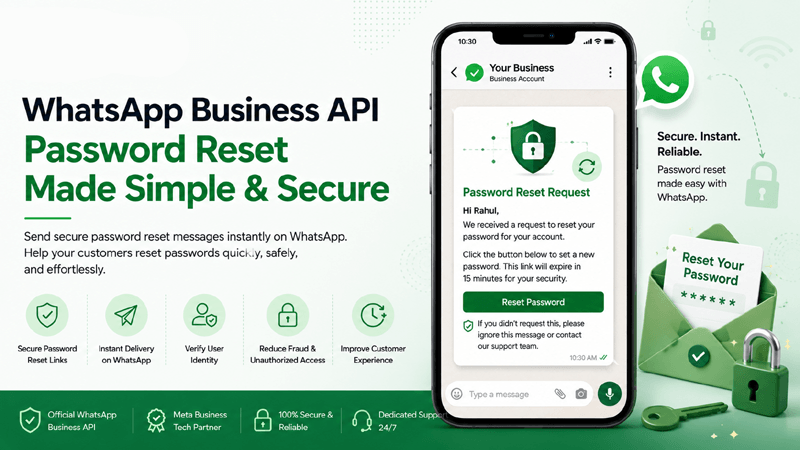
What is WhatsApp Business API Password Reset?
A WhatsApp Business API Password Reset workflow is an automated, secure security protocol that delivers one-time passwords (OTPs), confirmation alerts, and secure recovery links straight to a verified customer phone number. By moving away from vulnerable email-based links, enterprises protect sensitive accounts from phishing and account takeover attacks while utilizing robust Templates designed for authentication.
How Automated Password Reset Messages Work
When a user requests assistance on your application or portal, the backend system triggers an API call to QuickMessage. Within milliseconds, a secure verification token or code is generated and dispatched via the official channel. Because delivery rates on chat applications drastically outperform traditional SMS, users experience zero delays, ensuring seamless Flow Builder automation across every touchpoint without manual supervision.
Why Businesses Use WhatsApp for Secure Account Recovery
Global consumers rely daily on chat apps for critical communication, making it the most trusted and familiar environment for identity verification. Businesses implement these safeguards to lower abandonment rates during frustrating login roadblocks. Integrating these triggers with CRM Integrations and monitoring activities via Analytics Reports gives security teams full visibility and audit readiness.
Why Password Reset Automation Matters
Discover how automated recovery workflows elevate your brand's security posture and user satisfaction.
Faster Account Recovery
Eliminate tedious security questions and lost email credentials. Instant OTP delivery gets genuine users back into their dashboards in seconds.
Improved Customer Experience
Transform a high-friction support bottleneck into a smooth, self-service mobile interaction that delights users across every device.
Enhanced Account Security
Send codes only to the phone number registered on the account, so a stolen password alone is not enough to take it over.
Reduced Support Tickets
Free up your Shared Team Inbox and support agents from manual password reset requests by automating the entire lifecycle.
Instant OTP Delivery
Bypass flaky SMS gateways that suffer from carrier delays. Direct API pushes ensure immediate delivery globally.
Higher Customer Trust
Codes arrive from your official WhatsApp business account with your approved display name, so users can see they come from your brand.
Enterprise Authentication Features
Explore the comprehensive toolset designed to power secure, scalable, and seamless password reset workflows.
Instant Password Reset Notifications
Broadcast rapid alerts the second a recovery action is requested, offering immediate visibility to account owners.
Secure OTP Delivery
Transmit randomized numeric or alphanumeric verification codes safely across encrypted chat routes.
Personalized Reset Messages
Incorporate customer names and masking details dynamically to maintain context and verify identity.
One-Time Password Verification
Validate code entries natively using interactive reply buttons or text inputs configured via our Flow Builder.
Dynamic Variables
Populate expiration timestamps and user-specific reference identifiers automatically into approved templates.
Rich Media Support
Attach security badge imagery or instructional guides sourced directly from your centralized Media Library.
CRM Integration
Sync password reset attempt histories and verification statuses instantly into profiles via native CRM Integrations.
Flow Builder Automation
Design branching authentication trees without writing complex backend scripts using visual node editors.
Shared Team Inbox
Escalate failed authentication loops or locked accounts seamlessly to human operators in your Shared Team Inbox.
Multi-language Templates
Deploy pre-approved localized recovery notifications for global user bases with multi-language support.
Campaign Analytics
Measure success rates, delivery speeds, and user drop-off metrics through comprehensive Analytics Reports.
Secure Authentication Workflows
Maintain strict compliance guardrails designed for high-stakes enterprise cybersecurity environments.
How Password Reset Automation Works
Follow the seamless, automated journey of secure account recovery from request to final confirmation.
User Requests Password Reset
A user clicks "Forgot Password" on your web or mobile application interface and submits their registered phone number.
System Generates Secure OTP or Reset Link
Your secure backend generates a cryptographically sound, time-sensitive verification token or one-time code.
WhatsApp Business API Sends Message
QuickMessage securely pushes the pre-approved notification template instantly via official chat gateways.
User Verifies Identity
The user inputs the received OTP into your application screen or clicks the interactive button to validate ownership.
Password Successfully Reset
Once verified, the user establishes a fresh, secure password within your protected environment.
Confirmation Message Sent
An automated security alert confirms the password modification, safeguarding the account against malicious updates.
Enterprise and Customer Benefits
Discover how automated password recovery delivers unmatched operational speed for businesses and frictionless security for customers.
Business Benefits
- Faster Recovery: Streamline login restoration workflows to keep platform retention metrics high.
- Better Security: Protect platform infrastructure from credential stuffing attacks with cryptographic uniqueness.
- Lower Support Costs: Minimize human intervention for repetitive account access inquiries.
- Reliable Delivery: Bypass unreliable telecom infrastructure with carrier-grade API channels.
Customer Benefits
- Improved Customer Satisfaction: Enjoy frictionless, instantaneous account access recovery without waiting on hold.
- Automated Workflows: Experience clean, guided conversational menus that require zero manual effort.
- Absolute Peace of Mind: Users get codes from your official WhatsApp business account instead of email links that are easy to fake.
- Familiar Interface: Recover accounts directly within the chat app you use every single day.
Industry Use Cases for Password Reset Automation
See how high-security sectors implement secure identity recovery pipelines to protect user accounts and maintain compliance.
Banking
Authenticate online banking password resets with rigorous compliance safeguards.
Financial Services
Secure investment portal logins and transaction PIN recovery instantly.
Insurance
Protect policyholder dashboard access against identity theft and fraud.
Healthcare
Safeguard patient portal records with strict privacy-compliant verification tokens.
Education
Streamline student portal access recovery for virtual learning platforms.
Ecommerce
Prevent checkout cart abandonment caused by locked user accounts.
Retail
Secure customer loyalty reward accounts and profile settings.
Travel
Help travelers regain account access quickly before upcoming departures.
Hospitality
Authenticate guest booking management portals securely on mobile.
SaaS Platforms
Power reliable multi-tenant workspace login recovery workflows.
IT Services
Verify enterprise technician and client portal credentials seamlessly.
Government Portals
Deliver citizen identity verification alerts with top-tier encryption.
Why Choose QuickMessage
Enterprise infrastructure built for uptime, performance, and complete security compliance.
Frequently Asked Questions
Expert guidance on implementing password reset automation, security compliance, and user verification.
How does a WhatsApp Business API Password Reset work?
A password reset via WhatsApp Business API operates by connecting your application backend directly to secure messaging endpoints. When a user requests account recovery, your server triggers an automated API request. QuickMessage then formats and dispatches a verified authentication template containing a unique one-time password (OTP) or secure recovery token directly to the user's mobile device, replacing traditional email links with a faster, highly encrypted mobile alternative.
Why is OTP delivery via WhatsApp safer than traditional SMS?
Traditional SMS messages travel unencrypted across legacy carrier networks, making them vulnerable to interception, SIM swapping, and SS7 protocol exploits. WhatsApp messages travel encrypted instead of as plain SMS, and they arrive from your official business account with your approved display name, which makes fake messages easier to spot.
Can I automate the entire WhatsApp authentication workflow?
Yes, complete end-to-end automation is easily achieved using QuickMessage. Our platform allows developers and system administrators to configure webhooks and visual logic branches via our drag-and-drop Flow Builder. From the initial password recovery trigger to OTP code validation and final confirmation alerts, the entire process executes programmatically in milliseconds without requiring manual oversight from customer support teams.
What are the template requirements for sending reset notifications?
Meta maintains strict guidelines for authentication templates to protect user privacy and prevent spam. Password reset notifications must use pre-approved authentication message templates that include dynamic variable parameters for security codes and expiration times. QuickMessage helps businesses draft, submit, and manage these official templates seamlessly through our integrated template management dashboard, ensuring rapid compliance approval.
How does CRM integration support account recovery tracking?
Integrating your password reset workflows with your CRM through our custom CRM Integrations enables automatic logging of every security event. Whenever a user requests a recovery code, the interaction timestamp, delivery status, and verification outcome are recorded directly within their customer profile. This gives security and support teams an auditable timeline of account activity to investigate suspicious behaviors efficiently.
Are password reset messages delivered instantly worldwide?
Global message delivery is one of the primary advantages of utilizing enterprise-grade infrastructure. Unlike local SMS aggregators that face regional carrier throttling, official API connections route through robust, high-availability data channels. This ensures that whether your user base resides in North America, Europe, or Asia, verification codes arrive within seconds, drastically reducing drop-offs and login frustration.
What happens if a user fails multiple OTP verification attempts?
Robust security protocols require intelligent fallback measures. If a user inputs incorrect verification codes multiple times, your automated flow can temporarily lock the recovery attempt and trigger an alert. Through QuickMessage, the system can instantly route the locked account inquiry to a human agent waiting in your Shared Team Inbox, allowing them to perform manual identity verification securely before granting access.
Can authentication templates include interactive action buttons?
Only one-time password buttons. Meta allows three types on authentication templates: copy code (the user taps to copy the code), one-tap autofill (opens your Android app with the code filled in) and zero-tap (Android only, your app reads the code with no tap). Other buttons, such as "Contact Support", are not allowed. Send those in a separate utility template or in a reply within the 24-hour service window.
How do analytics reports help optimize authentication flows?
QuickMessage analytics reports show whether each message was delivered and read. Compare this with the verification results from your own system to see where users drop off during login recovery, for example codes that were delivered but never entered.
Is setting up automated password resets compliant with data privacy laws?
Sending a code only when the user asks for one is a good start, but compliance with laws such as India's DPDP Act, GDPR or CCPA depends on how your business collects, stores and uses personal data. Ask your legal team to review your full recovery flow, including consent and data retention.
How do we handle international phone number formats during password reset?
Proper formatting of international phone numbers is critical for successful API delivery. QuickMessage automatically validates and standardizes incoming numbers into E.164 format (including correct country codes) before dispatching reset tokens. This prevents delivery failures caused by missing prefixes or incorrect local dialing formats, ensuring a flawless recovery experience for global digital platforms.
Can we customize the branding of our password reset notifications?
While Meta regulates authentication templates to maintain security standards, your verified business profile displays your official brand name, logo, and blue checkmark verification badge. Additionally, you can utilize your brand colors and custom headers in companion web pages, ensuring that users always recognize the recovery notification as authentic and directly tied to your platform.
What are the best practices for setting OTP expiration times?
Industry best practices recommend setting OTP codes to expire within 3 to 5 minutes of generation. This limits the window of opportunity for unauthorized actors who might gain temporary access to a device. WhatsApp authentication templates can show an expiry note of 1 to 90 minutes, set when you create the template, so users see how long the code is valid.
How do we test password reset workflows before going live?
Test with a few internal phone numbers first: trigger password resets, check your webhook responses and confirm the codes are delivered and accepted. Our team helps you set up and test the integration during onboarding.
Why should enterprises choose QuickMessage for authentication messaging?
QuickMessage gives you the official WhatsApp Business API with a dashboard, Flow Builder, Shared Team Inbox, and a REST API with webhooks to connect your own systems. Onboarding and template approval help come with every plan, and Enterprise plans include a dedicated account manager.
Secure Your User Accounts Today
Upgrade your authentication security and eliminate support bottlenecks with QuickMessage's enterprise-grade password recovery automation.


