WhatsApp Message
Templates
Drive action with highly interactive, personalized, and rich-media messages. Create, manage, and auto-sync Meta-approved whatsapp message templates directly from your QuickMessage dashboard.
Dynamic Flash Sale
Hi {{1}}, our {{2}} flash sale is live! Get {{3}}% off your next purchase.
{
"type": "template",
"name": "flash_sale_01",
"components": [ ... ]
}
Ready-to-Deploy
Interactive Message Templates
Drive higher conversions with rich media, dynamic variables, and interactive buttons. Easily submit and auto-sync templates directly with the Meta API.
Abandoned Cart Recovery
Marketing
Hi {{1}},
You left some great items in your cart! Complete your purchase today and get {{2}}% off using code {{3}}.
Dispatch Notification
Utility
📦 Order Dispatched!
Hi {{1}}, your order #{{2}} is on the way. It will be delivered by {{3}}.
Secure OTP Delivery
Auth
🔒 {{1}} is your verification code for QuickMessage.
For your security, do not share this code with anyone.
Streamlined Submission, Managed for You
Submit templates directly from your QuickMessage dashboard — no need to log into Meta Business Manager separately. Meta's own review typically takes anywhere from a few hours up to 24 hours.
Engineered for
Maximum Conversion
Modern whatsapp business api templates go far beyond basic text. Leverage rich media and interactive components to drive immediate user action.
Dynamic Variables {{x}}
Personalize every message at scale. Inject customer names, order IDs, and dynamic pricing natively via API webhooks.
Rich Media Headers
Capture attention instantly. Attach high-resolution images, promotional videos, or PDF documents directly to the top of your templates.
Interactive Buttons
Add Quick Reply buttons to trigger automated chatbot flows, or use Call-to-Action buttons to drive traffic to specific URLs or initiate phone calls.
What are WhatsApp Template Messages?
Unlike standard texting, the Official WhatsApp Business API operates on strict anti-spam policies to protect users. If a customer messages your business, a 24-hour customer service window opens, allowing your team to reply freely via our WhatsApp Shared Team Inbox.
However, if you want to initiate a conversation with a customer, or reply to a customer after the 24-hour window has closed, you must use a pre-approved WhatsApp Template Message. These templates ensure that business-initiated conversations are high-quality, expected, and free of spam — see our guide on official vs. unofficial WhatsApp API providers for why this matters.
Meta Approved
Every template is reviewed by Meta to ensure it aligns with WhatsApp's commerce and messaging policies.
Outside 24h Window
The only legitimate way to reach out to a customer proactively after the standard customer service window expires.
Highly Structured
Built with specific variables, headers, and interactive buttons to drive deep user engagement.
Types of WhatsApp Templates
Designed to generate awareness, drive sales, and retarget customers. Any template that contains promotions, discounts, upsells, or event invitations falls into this category — typically deployed as broadcast campaigns to opted-in customers.
Example:
"Hi {{1}}, our Summer Sale is live! Get 20% off your entire cart using code SUMMER20. Tap below to shop now."
Triggered by a specific user action — usually fired via API the moment something changes in your CRM or ERP. These templates confirm, update, or resolve an ongoing transaction or account status, and must not contain promotional language.
Example:
"Dear {{1}}, your order #{{2}} has been successfully shipped. It will arrive by {{3}}. Track your package below."
Highly secure, strict-format templates used exclusively for verifying user identity — one-time passwords, account recovery codes, and login verification alerts during login or account recovery processes.
Example:
"{{1}} is your verification code. For your security, do not share this code with anyone."
How Template Approval Works
Meta reviews every submitted template to ensure compliance with commerce guidelines. With QuickMessage, this workflow is fully integrated into your dashboard.
Draft
Create content, add variables, and attach rich media.
Submit
Template is securely pushed via API to Meta for review.
Meta Review
Reviewed for spam, formatting, and policy violations.
Approved
Template is active and ready to be broadcasted instantly.
| Status Badge | Meaning | Action Required |
|---|---|---|
| Pending | Template is currently under review by Meta. | Wait (Usually resolves in 1-24 hours). |
| Approved | Template is fully compliant and ready. | Ready for Campaigns or Automations. |
| Rejected | Violates Meta Commerce or Messaging Policies. | Edit content, check variables, and resubmit. |
| Paused | Users are frequently blocking/reporting this specific template. | Review audience targeting; wait for auto-resume. |
| Disabled | Template repeatedly received negative feedback. | Template is dead. Create a new, improved version. |
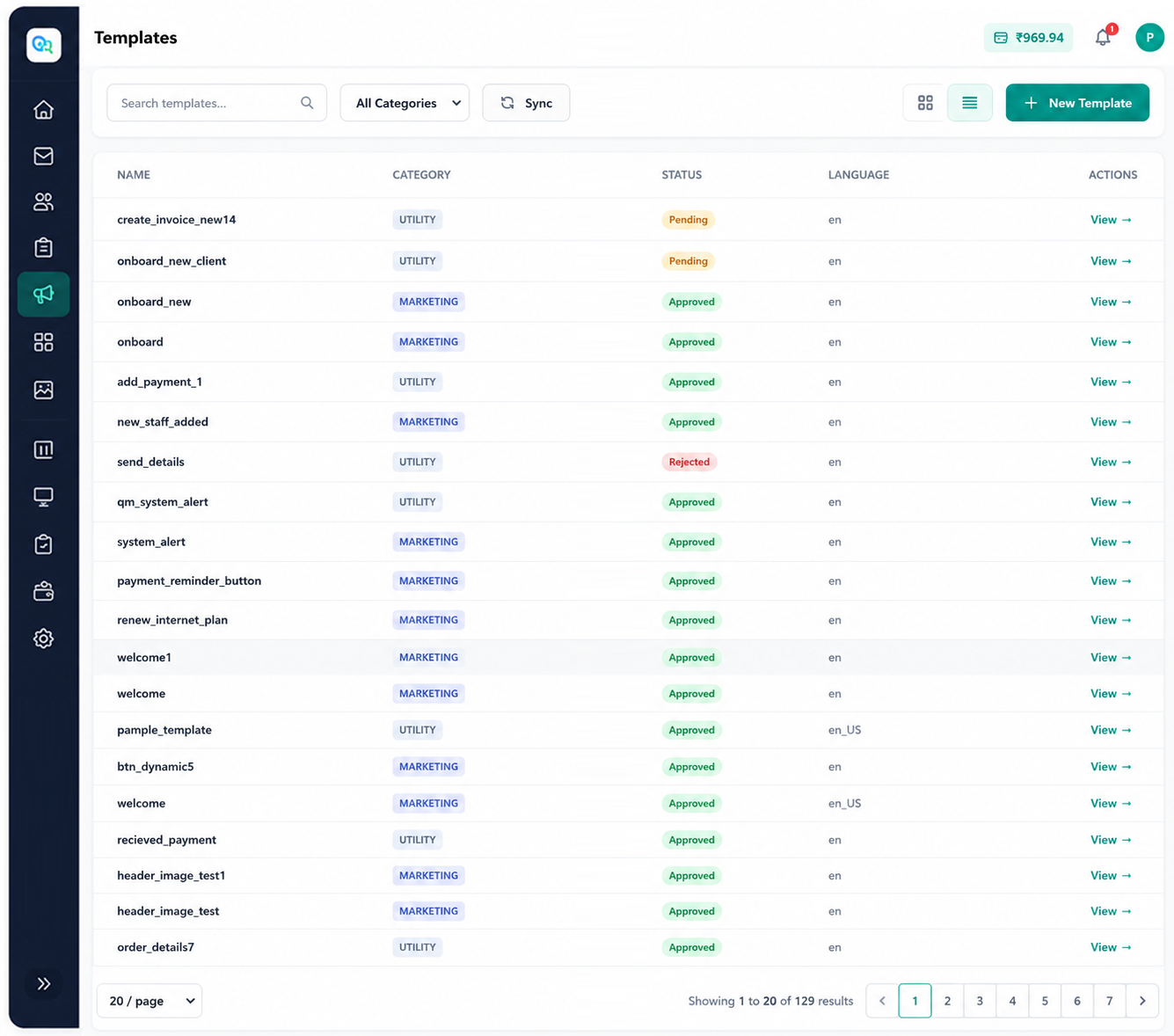
WhatsApp Template Management inside QuickMessage
You don't need to log into the complex Facebook Business Manager to handle messaging. QuickMessage provides an intuitive, enterprise-grade interface to manage your entire template repository effortlessly.
-
Create & Submit: Visual builder to construct text, media, and button-heavy templates without writing code.
-
Multi-Language Support: Group translations under a single template name to automatically serve users in their preferred device language.
-
Live Preview: See exactly how the message will render on iOS and Android before submitting.
-
Global Search & Categories: Filter your template library by category (Marketing, Utility), approval status, or language.
-
Duplicate & Archive: Quickly clone successful templates for new campaigns, or archive obsolete ones to keep your workspace clean.
Dynamic Personalization via Template Variables
Enterprise messaging cannot be robotic. WhatsApp Templates utilize indexed placeholders {{1}}, {{2}} which dynamically inject data pulled from your CRM Integrations or API calls at the moment of sending.
Common Variable Uses
{{1}}Customer Name{{2}}Order ID or Invoice Number{{3}}Transaction Amount{{4}}Tracking Link / URL Extension{{5}}Appointment Date & Time{{6}}One-Time Password (OTP)
Sample JSON Structure (For Devs)
An illustrative example of how variables are commonly passed in a template message request. Full technical details are in our developer documentation.
{
  "template": {
    "name": "shipping_update",
    "language": { "code": "en_US" },
    "components": [
      {
        "type": "body",
        "parameters": [
          { "type": "text", "text": "John Doe" },
          { "type": "text", "text": "#ORD-8891" },
          { "type": "text", "text": "Friday, 12th" }
        ]
      }
    ]
  }
}
WhatsApp Template Library
This is your hub for WhatsApp template guidance — explore ready-to-use, Meta-approved template frameworks by use case below, or read the sections above for template types, variables, and the approval process.
Professional Formal Messages
Standardize your corporate communication with polished, enterprise-ready templates.
Read MoreAdmission Messages
Automate enrollment updates, document requests, and welcome kits for students.
Read MoreParent Communication
Keep parents informed with attendance alerts, fee reminders, and event notices.
Read MoreEvent Invitations
Drive attendance with personalized webinar, conference, and launch event invites.
Read MoreLoan Offers
Securely pitch pre-approved loans and financial services directly to qualified leads.
Read MoreRefer & Earn
Boost your viral growth loop with highly shareable referral program templates.
Read MoreOrder Confirmation
Send instant receipts, item summaries, and estimated delivery dates post-purchase.
Read MoreShipping Updates
Reduce support tickets by proactively pushing dispatch and transit tracking links.
Read MorePayment Reminder
Improve cash flow with polite, automated due-date reminders containing payment links.
Read MoreAppointment Reminder
Slash no-show rates for clinics, salons, and consultants with timely notifications.
Read MoreMembership Renewal
Retain gym, club, or loyalty members with proactive renewal links.
Coming soonFee Reminder
Gentle prompts for tuition or service fees before late penalties.
Coming soonTrack Template Performance
To truly understand the ROI of your conversational commerce efforts, you must measure how users interact with your templates. QuickMessage's native WhatsApp Analytics module provides deep visibility.
- Approval Rate: Monitor how often your templates pass Meta's review process to adjust your copywriting strategy.
- Delivery & Read Rates: See exactly when messages are delivered and read, so you know which templates are actually landing with customers.
- Click-Through Rate (CTR): Track how many users tapped your URL buttons or Quick Replies.
- Failures & Bounces: Identify inactive numbers immediately to clean your contact lists and save costs.
- Optimization Tips: The platform will flag templates whose quality rating drops, allowing you to pause campaigns before risking a block.
Best Practices for Template Messaging
Write better templates that get approved and convert effectively.
Use Personalization
Always use variables like `{{1}}` for names. Generic blasts look like spam and get blocked by users.
Optimize Your CTA
Don't rely on users typing a reply. Use interactive Quick Reply buttons or clear URL buttons to direct traffic.
Follow Meta Policies
Ensure your business complies with WhatsApp's commerce policies. Prohibited industries (e.g., gambling, adult content) will face permanent bans.
Common Reasons for Rejection
-
Promotional Wording in Utility: Trying to sneak a discount code into a shipping update template.
-
Vague Variables: Using a variable at the very beginning or end of a template without surrounding text context.
-
Formatting Issues: Spelling mistakes, incorrect URL formats, or broken curly brackets (e.g., `{1}` instead of `{{1}}`).
-
Spammy Language: Overuse of ALL CAPS or excessive exclamation marks in marketing templates.
Enterprise Industry Use Cases
Ecommerce
Abandoned carts, back-in-stock
Education
Admissions, fee reminders
Healthcare
Appointments, reports
Finance
Loan approvals, OTPs
Travel
Boarding passes, delays
Real Estate
Site visits, brochures
SaaS
Trial expiry, webinars
Agencies
Client campaign management
Why Choose QuickMessage?
QuickMessage is more than just a template manager. We are an Official Meta Partner offering a unified ecosystem. Create your templates, weave them into intricate Flow Builder automations, deploy a WhatsApp Chatbot, and manage team permissions via our Team Management suite—all from one platform.
Request Free ConsultationPlatform Comparison
| Feature | QuickMessage (Official API) | WhatsApp Business App | Unofficial Tools (Spam) |
|---|---|---|---|
| Meta-Approved Templates | Yes (Built-in) | No (Manual typing only) | No (Bypasses rules) |
| Dynamic Variables {{x}} | Yes | No | Basic |
| Interactive Buttons | Yes (URL, Call, Quick Reply) | No | No / Buggy |
| Ban Risk | Minimal (when compliant) | Medium (If spamming) | High |
| Template Analytics | Yes (Deep insights) | No | None |
Curious why unofficial tools carry that risk? See our guide on official vs. unofficial WhatsApp API providers.
Start building high-converting
Templates today.
Join enterprise teams relying on QuickMessage to automate customer engagement, sync templates seamlessly, and drive massive ROI.
Frequently Asked Questions
What are WhatsApp Template Messages?
WhatsApp Template Messages are pre-approved message formats used by businesses to initiate conversations with opted-in customers using the Official WhatsApp Business API.
Why do WhatsApp templates need Meta approval?
Meta requires approval for all business-initiated templates to ensure they comply with WhatsApp's Commerce and Business Policies, preventing spam and maintaining a high-quality user experience.
What is the 24-hour messaging window rule?
When a customer sends a message to your business, a 24-hour customer service window opens. During this time, you can reply with free-form text. Outside this window, you must use a Meta-approved Template Message to re-initiate the conversation.
Can I personalize WhatsApp template messages?
Yes, templates support dynamic variables (e.g., {{1}}, {{2}}). You can use these placeholders to insert customer names, order IDs, appointment dates, and personalized URLs.
Can I include images or buttons in templates?
Absolutely. Rich media templates allow you to include headers (Images, Videos, PDFs), Quick Reply buttons, and Call-to-Action (CTA) buttons like "Visit Website" or "Call Now".
Why was my WhatsApp template rejected?
Common causes include promotional language inside a Utility-category template, variables used without enough surrounding text context, formatting mistakes like broken curly brackets, or spammy language such as excessive capitals. See the "Common Reasons for Rejection" section above for the full list.
What's the difference between Marketing and Utility templates?
Marketing templates cover promotions, offers, and broad announcements. Utility templates are triggered by a specific action (like an order shipping) and confirm, update, or resolve a transaction — they must not contain promotional language.
How does WhatsApp template pricing work?
Sending a template starts a billable conversation, charged by Meta based on the template's category (Marketing, Utility, or Authentication) and destination country. See our WhatsApp Business API pricing page for current rates.
Can I edit an approved WhatsApp template?
No — an approved template's content is locked. To change the wording, you create a new template version and submit it for a fresh review; the original stays active until the new one is approved.
For more detailed questions, contact our support team.