

Master Campaign Performance with WhatsApp Analytics & Reports
Gain deep operational clarity, track message delivery, and optimize customer engagement metrics using real-time WhatsApp Analytics & Reports powered by the official WhatsApp Business API.
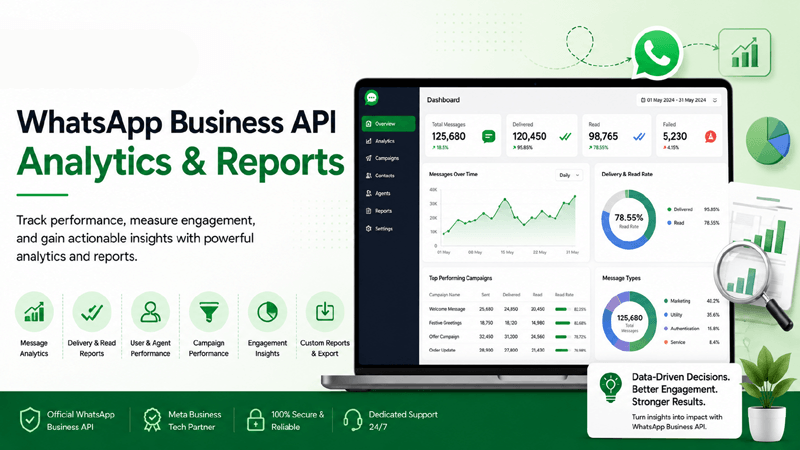
Quick Overview of WhatsApp Analytics & Reports
Understand how comprehensive data tracking transforms messaging metrics into actionable intelligence, driving strategic growth and superior customer engagement.
What is WhatsApp Analytics & Reports?
WhatsApp Analytics & Reports represents the systematic measurement, collection, and evaluation of communication metrics generated across your enterprise messaging channels. Built directly into the WhatsApp Business API, this reporting suite captures delivery confirmations, open frequencies, interaction drop-offs, and human support velocity. Instead of guessing campaign performance, decision-makers rely on exact data streams to refine outreach.
Why Analytics Matter for Business Messaging
Enterprise communication requires rigorous accountability. Without granular tracking, organizations cannot determine whether promotional broadcasts or automated support flows yield positive returns. Monitoring engagement trends allows leaders to identify successful Templates, eliminate bottlenecks within automated sequences built via the Flow Builder, and ensure support agents maintain peak efficiency inside the Shared Team Inbox.
How Reporting Improves Engagement and Performance
Effective reporting bridges the gap between raw data and commercial execution. By evaluating metrics alongside customer records synchronized through native CRM Integrations, organizations can segment audiences precisely and target specific consumer cohorts. Furthermore, insights derived from Campaign Management reports enable marketing teams to adjust content in real time, elevating conversion rates and customer satisfaction.
Why Analytics & Reports Matter for Enterprises
Discover how continuous data monitoring optimizes campaign execution, elevates support quality, and maximizes return on investment across every channel.
Measure Campaign Success
Evaluate outreach effectiveness instantly by analyzing delivery volumes, recipient engagement ratios, and conversion milestones for every broadcast.
Monitor Delivery Rates
Track message transmission success across global telecom networks to ensure your official WhatsApp Business API connection remains optimal.
Track Read Receipts
Gain precise visibility into when customers open and review your notifications, removing guesswork from follow-up timing and sales cycles.
Understand Customer Engagement
Analyze interaction patterns, peak messaging hours, and preferred communication media stored within your centralized Media Library.
Optimize Marketing Campaigns
A/B test different message variations and target refined Contact Lists based on historical response data to maximize outreach efficiency.
Improve Customer Support
Measure agent response times and resolution efficiency across your Team Management roster to eliminate service bottlenecks.
Advanced Features for WhatsApp Analytics & Reports
Explore the sophisticated reporting toolkit engineered to provide total transparency, granular performance tracking, and actionable business insights.
Real-time Dashboard
Monitor active conversations, live message queues, and immediate traffic spikes through a dynamic central interface.
Message Delivery Reports
Inspect detailed transmission logs showing sent, delivered, and failed message statuses across all numbers.
Read & Reply Analytics
Measure the exact time lag between message delivery and customer interaction or response receipt.
Campaign Performance
Evaluate broadcast ROI, audience response rates, and opt-out percentages for every marketing initiative.
Agent Performance
Audit individual support operator workload, resolution speed, and customer satisfaction ratings seamlessly.
Conversation Reports
Analyze user-initiated versus business-initiated conversation volumes to monitor API session costs effectively.
Customer Engagement Metrics
Identify trending topics, inquiry categories, and interaction frequency across your consumer base.
Click Tracking
Measure click-through rates on interactive buttons, links, and catalog items included in chat messages.
Template Performance
Compare approval statuses and engagement success across various pre-approved message formats.
Custom Reports
Build tailored analytical views focusing on specific KPIs, department queues, or campaign tags.
Export Reports
Download comprehensive datasets in CSV or Excel formats for offline auditing and executive presentation.
Scheduled Reports
Automate report generation and delivery directly to stakeholder inboxes on daily, weekly, or monthly cycles.
Filter & Search
Isolate specific date ranges, campaign identifiers, or geographic regions with advanced filtering tools.
Role-Based Reporting
Restrict or grant analytical access levels securely based on organizational hierarchy and employee roles.
How WhatsApp Analytics & Reports Works
A transparent, six-step journey illustrating how raw messaging activity is captured, processed, and converted into strategic enterprise insights.
Collect Messaging Data
Every outbound broadcast, inbound query, and system event is tracked securely through the official WhatsApp Business API.
Track Customer Activity
User interactions, button clicks, and read confirmations are logged in real-time alongside profile data synced via CRM Integrations.
Generate Reports
Advanced processing engines aggregate raw metrics into structured visual dashboards and downloadable spreadsheets.
Analyze KPIs
Supervisors and analysts evaluate delivery success, response velocities, and conversion percentages against established benchmarks.
Optimize Campaigns
Marketing and sales leaders refine future broadcast schedules, text templates, and automated workflows to maximize engagement.
Improve Business Performance
Drive continuous operational growth, reduce customer support friction, and elevate overall return on marketing investment.
Business and Customer Benefits
Discover how data-driven reporting delivers strategic advantages for commercial enterprises while fostering exceptional experiences for consumers.
Business Benefits
- Data-Driven Decisions: Eliminate guesswork by grounding marketing and support strategies in verified performance metrics.
- Maximized Campaign ROI: Identify high-converting broadcast strategies and reallocate budget toward successful outreach vectors.
- Workforce Efficiency: Monitor support team velocity and identify operational bottlenecks to optimize staff scheduling.
- Audit Readiness: Maintain comprehensive historical transmission logs required for corporate compliance and review.
Customer Benefits
- Faster Issue Resolution: Experience reduced waiting times as support teams utilize performance insights to streamline workflows.
- Relevant Communications: Receive targeted, highly tailored updates rather than generic, uninspired promotional blasts.
- Reliable Service Delivery: Enjoy consistent, high-uptime interactions backed by rigorous infrastructure monitoring.
- Enhanced Satisfaction: Benefit from an organization that actively measures and refines service quality based on direct feedback.
Industry Use Cases for WhatsApp Analytics
Discover how diverse market verticals leverage analytical reporting to optimize engagement and measure communication impact.
Retail
Measure promotional campaign open rates and seasonal flash sale conversion metrics.
Ecommerce
Track cart recovery notification performance and click-through rates on digital catalogs.
Healthcare
Monitor appointment reminder delivery confirmations and patient response ratios.
Education
Analyze prospective student engagement across automated admissions advisory flows.
Finance
Audit transactional alert transmission success and secure support resolution speeds.
Insurance
Evaluate policy renewal notification engagement and claims support turnaround times.
Travel
Track flight status alert delivery rates and traveler support chat satisfaction.
Hospitality
Measure guest satisfaction survey completion rates and concierge response velocity.
Real Estate
Audit property viewing lead response times and broker follow-up effectiveness.
Automotive
Track service booking confirmation rates and showroom inquiry conversion analytics.
Telecom
Analyze automated billing notification delivery and technical support ticket resolution.
Government
Monitor public service announcement reach and citizen query handling efficiency.
Why Choose QuickMessage
Enterprise infrastructure built for uptime, performance, and complete security compliance.
Frequently Asked Questions
Expert guidance on leveraging analytics, tracking campaign performance, evaluating agent metrics, and maximizing business intelligence.
What is included in WhatsApp Analytics & Reports?
WhatsApp Analytics & Reports provides a comprehensive suite of data tools that monitor message delivery rates, read confirmations, response velocity, agent workload distribution, and campaign conversion percentages. By integrating directly with the official API, the dashboard aggregates real-time traffic data into visual charts and downloadable reports, empowering enterprise leaders to evaluate communication effectiveness and make informed strategic adjustments without manual data compilation.
How do business reports improve campaign tracking?
Campaign tracking relies on precise measurement of broadcast reach, open frequency, and recipient engagement. Detailed reporting allows marketing teams to evaluate which message templates perform best across specific demographic segments. By reviewing click-through rates on interactive buttons and tracking conversion milestones, organizations can refine future outreach strategies, eliminate underperforming content, and achieve significantly higher return on marketing investment across every broadcast.
Can I track individual agent performance in customer support?
Yes, agent performance tracking is a core component of enterprise reporting. Supervisors can monitor individual response velocity, total conversation volumes handled, resolution timeframes, and customer satisfaction (CSAT) scores. These granular insights highlight top-performing operators and identify areas where additional training may be required, ensuring that customer support standards remain consistently high across your entire team.
How does conversation analytics help manage API costs?
WhatsApp Business API pricing is structured around conversation sessions rather than per-message fees, categorized into user-initiated and business-initiated chats. Conversation analytics provide exact breakdowns of session volumes and durations. Monitoring these metrics helps financial and operational planners forecast communication expenses accurately, optimize automated chat routing, and prevent unnecessary billing charges by maintaining efficient conversational flows.
Are analytics reports updated in real-time?
Analytics dashboards operate on real-time data streaming feeds connected directly to messaging gateways. As messages are sent, delivered, read, or answered by support staff, corresponding metrics update instantly on the user interface. This live visibility enables supervisors to spot sudden traffic surges, identify delivery anomalies, and reallocate support resources dynamically to manage inbound queues effectively.
Can I export analytics data for external presentation?
Export functionality allows users to download complete analytical datasets in standard formats such as CSV and Excel. Organizations can easily import these files into corporate business intelligence tools, financial modeling software, or executive presentation decks. Additionally, automated report scheduling ensures that key stakeholders receive regular performance summaries directly in their email inboxes without manual intervention.
How do CRM integrations enhance reporting depth?
Connecting your messaging analytics with external databases through native CRM integrations bridges communication data with commercial outcomes. Instead of measuring mere chat interactions, reporting suites can correlate message delivery and response metrics directly with closed sales deals, customer lifetime value, and lead progression stages. This integration provides an unvarnished view of how WhatsApp engagement impacts overall business revenue.
What are the primary KPIs to monitor in WhatsApp reporting?
Essential key performance indicators include message delivery success rate, read receipt percentage, first response time (FRT), average handling time, resolution rate, and campaign click-through ratios. Monitoring these specific metrics provides a balanced scorecard evaluating both technical infrastructure reliability and human customer service quality across your enterprise messaging operations.
How do analytics evaluate automated bot effectiveness?
Analytics track how successfully automated flows built using the flow builder handle inbound inquiries before requiring human escalation. By measuring drop-off points, menu selection frequencies, and bot resolution rates, administrators can identify confusing prompt structures or missing menu options, enabling continuous refinement of automated customer self-service journeys.
Can access to analytics reports be restricted by user role?
Role-based access controls allow administrators to configure granular permissions governing who can view specific reports. While executive leadership and supervisors may require enterprise-wide performance visibility, individual support agents can be restricted to viewing their personal productivity metrics. This ensures data privacy and protects sensitive financial reporting from unauthorized internal access.
How does template analytics impact campaign compliance?
Template analytics track approval statuses, rejection reasons, and consumer engagement ratios for every submitted message format. Reviewing template performance helps organizations understand which phrasing styles resonate best with audiences while adhering strictly to Meta content guidelines, minimizing the risk of template suspension or account quality rating penalties.
What role do historical reports play in workforce planning?
Historical trend analysis reveals recurring patterns in customer inquiry volume across specific hours, days of the week, or seasonal periods. Workforce managers utilize these insights to forecast peak inbound traffic and schedule appropriate support staffing levels in advance, preventing agent burnout and ensuring rapid response times during high-demand business cycles.
How are delivery failures identified and investigated?
Delivery failure reports isolate undelivered messages and categorize error codes returned by carrier gateways, such as invalid phone numbers or inactive accounts. Technical administrators can inspect these error logs to clean contact lists, verify phone number formatting, and resolve connectivity bottlenecks rapidly before launching large-scale outbound broadcasts.
Can analytics measure customer sentiment over time?
By combining automated post-interaction CSAT surveys with keyword tagging in shared team inboxes, reporting suites track shifts in customer sentiment. Analyzing feedback trends helps organizations gauge overall brand perception, identify recurring product pain points, and adjust communication strategies to foster deeper consumer loyalty and trust.
Why choose QuickMessage for enterprise reporting?
QuickMessage delivers an enterprise-grade analytics infrastructure backed by official Meta partnerships and high-uptime cloud architecture. Organizations benefit from intuitive dashboards, seamless CRM synchronization, and dedicated support, transforming complex messaging streams into clear, actionable intelligence that accelerates commercial growth and operational excellence.
Ready to Transform Your Decision-Making with Data?
Empower your enterprise with actionable intelligence, real-time campaign tracking, and superior reporting powered by WhatsApp Analytics & Reports.


