

Automate WhatsApp customer reviews, CSAT surveys, and post-purchase feedback collection. Engage customers instantly through the official WhatsApp Business API to scale your business.
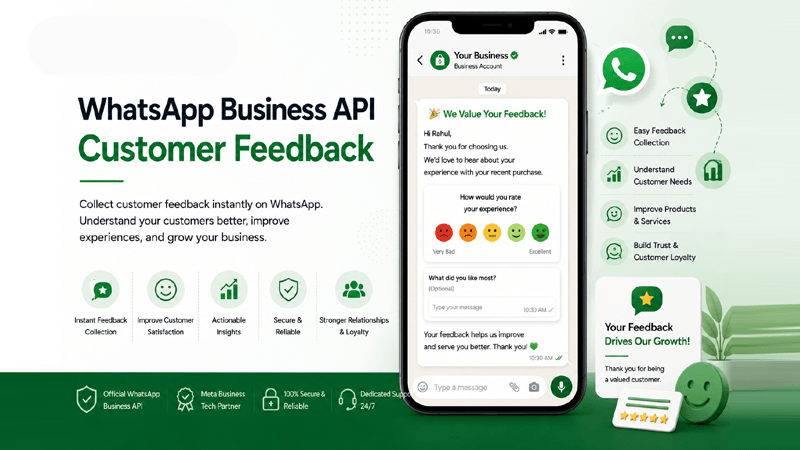
What is WhatsApp Customer Feedback?
Discover how utilizing the WhatsApp Business API transforms traditional feedback collection into highly engaging, real-time conversations.
Direct Channel Engagement
WhatsApp Business API Customer Feedback is the process of automatically sending review requests, CSAT surveys, and NPS queries directly to a customer's WhatsApp inbox. Because users check their WhatsApp messages multiple times a day, response rates are significantly higher compared to traditional email campaigns.
Why Businesses Need It
Customer Feedback via WhatsApp is essential for modern enterprises. It allows brands to instantly capture user sentiment right after a transaction or support interaction. By acting on immediate feedback, businesses can swiftly resolve issues, turn negative experiences around, and cultivate long-term customer loyalty.
Drive Growth with Automation
Automated review requests improve customer satisfaction by showing clients you value their opinion. Leveraging features like Flow Builder ensures that WhatsApp survey messages are dispatched at the precise moment of maximum impact, generating higher engagement and driving positive public reviews.
Why Customer Feedback Matters
Gathering WhatsApp Customer Reviews isn't just about ratings; it's a strategic initiative to measure and elevate your entire brand experience.
Measure Customer Satisfaction
Deploy instant WhatsApp CSAT surveys to track customer happiness in real-time. Quantifiable metrics allow you to monitor trends, benchmark performance, and proactively address declining satisfaction scores before they escalate.
Improve Customer Experience
By listening directly to the voice of the customer via WhatsApp Post Purchase Feedback, you identify precise touchpoints that cause friction. Utilizing this data allows your product and service teams to refine the overall customer journey.
Increase Online Reviews
Satisfied customers can be automatically redirected to platforms like Google or Trustpilot right from their WhatsApp chat. This automated WhatsApp Review Collection strategy dramatically multiplies your positive public feedback and social proof.
Build Customer Loyalty
Reaching out for feedback via the WhatsApp Business API shows customers that their opinion truly matters. This personalized engagement builds trust, transforming one-time buyers into loyal, long-term brand advocates.
Identify Service Improvements
Granular feedback allows operational leaders to spot recurring issues, such as delivery delays or product defects. With detailed WhatsApp Survey Messages, your team can pivot quickly and optimize internal service processes effectively.
Reduce Customer Churn
Negative feedback acts as a vital early warning system. By capturing dissatisfaction immediately and routing it to your Shared Team Inbox, support teams can intervene swiftly, resolve the issue, and ultimately prevent customer churn.
Strengthen Brand Reputation
Consistent, high-quality customer experiences inherently build a strong market reputation. Proactive feedback management positions your brand as customer-centric, reliable, and deeply committed to continuous operational excellence.
Enterprise WhatsApp Feedback Tools
Discover the powerful features behind QuickMessage’s WhatsApp Feedback Automation, built natively on the WhatsApp Business API to maximize your survey conversions.
Automated Feedback Requests
Set up triggers to automatically request feedback right after an interaction, purchase, or ticket closure without manual intervention.
WhatsApp CSAT Surveys
Calculate Customer Satisfaction Scores instantly by asking users to rate their recent experience directly within the chat interface.
Star Rating Collection
Provide an intuitive 1-5 star rating prompt. This universally understood metric makes it effortless for customers to leave rapid feedback.
Customer Review Requests
Intelligently route happy customers to third-party review sites to boost your public SEO presence and business reputation.
NPS Surveys via WhatsApp
Measure Net Promoter Score reliably by asking customers how likely they are to recommend your brand, using native WhatsApp buttons.
Personalized Feedback Messages
Utilize variables from your Contact Lists to personalize every survey, greeting the customer by name and referencing specific purchases.
Rich Media Surveys
Allow customers to submit photos or videos as part of their feedback. Great for documenting product defects or service issues securely.
Quick Reply Buttons
Eliminate typing effort by presenting clickable interactive Quick Reply buttons to drastically boost your survey completion rates.
Deep CRM Integrations
Sync all feedback directly back into your ecosystem via robust CRM Integrations for unified customer profile management.
Flow Builder Automation
Design multi-step conversational surveys visually. Create custom paths based on whether a customer leaves a positive or negative score.
Campaign Management
Send bulk feedback requests to segmented audiences effectively using our robust Campaign Management tools.
Analytics & Reports
Track delivery, read receipts, response rates, and sentiment analysis through highly detailed visual Analytics & Reports.
Shared Team Inbox
When a customer leaves poor feedback, route the chat instantly to a human agent in the Shared Team Inbox for immediate damage control.
Survey Scheduling
Delay survey messages to ensure they arrive at the optimal time—such as a few days after a product has been physically delivered.
Real-time Response Tracking
Monitor incoming customer insights live, ensuring zero latency between the customer submitting a response and your team receiving it.
How WhatsApp Feedback Automation Works
Our seamless workflow guarantees that your WhatsApp Customer Experience metrics are captured flawlessly at every critical touchpoint.
Customer Completes Purchase or Service
The journey begins when a customer completes a significant action. This could be checking out of a hotel, receiving an e-commerce order, finishing a telehealth appointment, or closing a support ticket.
Trigger Feedback Workflow
Your CRM or backend system communicates with QuickMessage. Using automated triggers, a pre-approved message Template is instantly queued for dispatch without manual entry.
Send Personalized WhatsApp Survey
Leveraging the WhatsApp Business API, a rich survey message containing quick replies, list messages, or star rating options is sent directly to the customer's phone.
Customer Shares Rating & Feedback
The customer engages with the interactive message, selecting their rating with a single tap. If additional context is needed, they can seamlessly type a qualitative response in the same chat window.
Analyze Survey Results
Data is captured in real-time. Sentiment analysis and quantitative metrics are updated instantly within your main QuickMessage dashboard for managers to review and report on.
Improve Customer Experience
You use these actionable insights to refine operations. High ratings can trigger a prompt to leave a public Google review, while poor ratings instantly alert a support agent via the shared inbox to resolve the concern.
Maximize ROI with WhatsApp Survey Messages
Implementing automated feedback loops brings incredible advantages to both your enterprise operations and the end customer experience.
Business Benefits
- Better Online Reputation: Automatically filter positive experiences to public review platforms, directly enhancing SEO and social proof.
- Actionable Customer Insights: Centralized analytics grant decision-makers clear visibility into product quality and service efficiency.
- More Positive Reviews: Utilizing the frictionless WhatsApp Business API achieves up to 5x higher survey completion rates compared to email.
- Automated Follow-ups: Reduce manual administrative overhead by triggering sequences autonomously based on user behavior and scores.
Customer Benefits
- Higher Customer Satisfaction: Customers appreciate brands that proactively seek and value their opinion immediately after interactions.
- Improved Customer Retention: Rapidly addressing negative feedback ensures customers feel heard, turning poor experiences into loyalty-building moments.
- Frictionless Experience: No need to log into portals, open long web forms, or check email. Everything happens organically inside their favorite messaging app.
- Personalized Communications: Customers receive context-aware messages that respect their time, rather than generic blast surveys.
WhatsApp Post Purchase Feedback for Every Sector
Explore how different industries leverage WhatsApp Feedback Automation to collect essential data, improve services, and drive customer excellence.
Ecommerce
Collect product reviews and delivery feedback instantly post-purchase.
Retail
Survey in-store shoppers on staff helpfulness and store cleanliness.
Healthcare
Gather secure, immediate feedback following telehealth or clinic visits.
Education
Evaluate course quality and instructor performance through fast student CSAT surveys.
Hotels
Send NPS surveys during or immediately after guest check-out to fix issues fast.
Restaurants
Ask diners about food quality and service right after their meal is delivered.
Travel
Assess booking experience and travel support satisfaction efficiently.
Finance
Measure client satisfaction following support tickets and loan processing.
Insurance
Collect post-claim resolution feedback to optimize your claims department.
Real Estate
Survey clients after property viewings to gauge agent performance.
Automotive
Acquire post-service maintenance feedback or dealership experience ratings.
Telecom
Send instant WhatsApp surveys after an installation or network support call.
The Enterprise WhatsApp Customer Engagement Platform
Trust the Official Meta Business Tech Partner to handle your WhatsApp Customer Experience strategies securely and at scale.
Official Meta Business Tech Partner
We maintain strict compliance and the highest tier of partnership directly with Meta, guaranteeing platform stability.
Official WhatsApp BSP
As a certified Business Solution Provider, we offer unmatched provisioning and support for the WhatsApp Business API.
Campaign Management
Utilize robust Campaign Management tools to broadcast feedback requests to segments of thousands seamlessly.
Flow Builder
Create intricate conversational surveys with our visual Flow Builder—no coding required.
CRM Integration
Our seamless API architecture supports advanced CRM Integrations for data harmonization.
Shared Team Inbox
Manage replies collectively using the Shared Team Inbox to ensure swift interventions for negative scores.
Analytics & Reports
Gain actionable insights with granular, exportable data from our Analytics & Reports module.
Media Library
Store and manage rich content such as product images for surveys inside your centralized Media Library.
Enterprise Security
Your customer feedback data is encrypted and managed with enterprise-grade privacy and data protection protocols.
Team Management
Utilize detailed Team Management capabilities to assign permissions and route specific feedback to designated managers.
Dedicated Support
Rely on our expert technical account managers and onboarding specialists to optimize your WhatsApp Customer Feedback strategy.
Frequently Asked Questions
Everything you need to know about setting up and automating WhatsApp Customer Experience surveys using the QuickMessage platform.
1. What is WhatsApp Business API Customer Feedback?
WhatsApp Business API Customer Feedback refers to the automated process of sending survey questions, rating requests, and feedback prompts directly to a customer's WhatsApp account after a specific interaction. By utilizing the official WhatsApp Business API, enterprise businesses can programmatically trigger these messages—such as NPS or CSAT surveys—ensuring high visibility. Because messages are sent to an app users check daily, companies experience significantly faster response times and higher engagement rates compared to traditional channels like email or web forms.
2. How does WhatsApp compare to email for CSAT surveys?
When deploying CSAT (Customer Satisfaction) surveys, WhatsApp vastly outperforms email. Email open rates traditionally hover around 20%, with survey completion rates often dropping below 5%. In contrast, WhatsApp boasts an open rate of over 90%, and because surveys can utilize Quick Reply buttons, the friction to respond is nearly zero. Customers simply tap a button to register their rating instantly. This seamless WhatsApp Customer Feedback mechanism guarantees you capture more statistically significant data, allowing for highly accurate measurement of customer satisfaction metrics.
3. Can we automate post-purchase feedback collection?
Absolutely. Automation is a core advantage of using QuickMessage. You can seamlessly integrate your e-commerce platform or ERP to detect when a purchase is finalized or an item is delivered. Once triggered, the system automatically pushes a WhatsApp Post Purchase Feedback template to the customer. By setting specific time delays (e.g., 2 days after delivery), you ensure the customer has had enough time to experience the product. This fully automated loop removes administrative burdens while consistently gathering vital reviews.
4. Are WhatsApp surveys compliant with privacy laws?
Yes, conducting surveys via the WhatsApp Business API is fully compliant with major data protection regulations like GDPR and CCPA, provided you adhere to opt-in rules. Customers must give explicit consent to receive messages from your business. Furthermore, Meta enforces strict policies on message content and frequency to prevent spam. QuickMessage assists enterprises in maintaining compliance by managing opt-in and opt-out lists reliably within the Contact Lists module, ensuring your feedback campaigns remain secure and legally sound.
5. How do we measure Net Promoter Score (NPS) on WhatsApp?
Measuring NPS on WhatsApp is highly efficient using interactive message formats. You can send a message asking the standard NPS question: "On a scale of 0 to 10, how likely are you to recommend us?" By utilizing WhatsApp List Messages or a sequence of Quick Reply buttons, customers can select their score instantly. The QuickMessage platform captures these numerical inputs, automatically categorizing respondents into Promoters, Passives, or Detractors, and visualizes your aggregate score directly in our comprehensive Analytics & Reports dashboard.
6. Can we integrate survey responses into our CRM?
Yes, deep data synchronization is a cornerstone of our enterprise offering. Through QuickMessage’s robust CRM Integrations, every WhatsApp Satisfaction Survey response is immediately tied to the specific contact record in your CRM, through a custom integration. This ensures that sales, marketing, and support teams have unified access to the customer's sentiment history. If a customer leaves a low rating, the CRM can automatically trigger a high-priority support ticket, enabling your agents to resolve the issue swiftly.
7. What are the best practices for sending WhatsApp survey messages?
To maximize engagement with WhatsApp Survey Messages, keep them concise and immediately actionable. Avoid long paragraphs; instead, state the purpose clearly and offer one-tap Quick Reply buttons (e.g., 1 to 5 stars). Timing is equally crucial—trigger the survey shortly after the customer’s interaction while the experience is fresh. Always personalize the greeting using variables from your database. Lastly, close the loop: if they leave a low score, ensure an agent follows up; if they leave a high score, politely request a public online review.
8. How does the Quick Reply button improve response rates?
Quick Reply buttons transform the user experience by eliminating the need to type. When a customer receives a WhatsApp Review Collection message, they are presented with clickable options—such as "Excellent," "Good," or "Poor," or a numerical scale. Because tapping a button takes less than a second, cognitive load and friction are drastically reduced. This frictionless design is directly responsible for the massive spike in completion rates, proving that making feedback effortless is the key to capturing high-volume customer insights.
9. Can multiple agents handle negative feedback via a Shared Team Inbox?
Absolutely. Effective WhatsApp Customer Experience management requires rapid intervention when things go wrong. If an automated survey captures a low score, QuickMessage’s routing engine can instantly assign that chat to a human agent in the Shared Team Inbox. Multiple agents can collaborate on the issue, view the customer's history, and communicate directly with them to resolve the grievance. This fast, coordinated response can easily convert an unsatisfied buyer into a loyal, lifelong customer.
10. Is it possible to trigger surveys based on specific customer actions?
Yes. Utilizing the WhatsApp Business API combined with our advanced automation tools, you can map surveys to virtually any operational trigger. Whether a user completes a webinar, finishes a trial period, has an order marked as "Delivered" by logistics software, or closes a support ticket, the API detects this action and deploys the appropriate feedback request. This targeted WhatsApp Feedback Automation ensures that context is maintained and that you are gathering data at the exact right moment.
11. How do we collect rich media (photos/videos) as feedback?
One of the standout features of WhatsApp is its native support for rich media. In scenarios where you need visual proof—such as an e-commerce return, property damage report, or food quality complaint—you can automate a prompt asking the customer to simply reply with a photo or video. These media files are securely received and stored in your QuickMessage account, allowing quality assurance teams to inspect the issue visually. This capability elevates standard feedback mechanisms into comprehensive service recovery tools.
12. Can we use templates for automated feedback requests?
Yes, initiating a conversation with a customer outside the 24-hour service window requires an approved Message Template by Meta. QuickMessage simplifies this by providing a library of pre-approved, highly converting feedback and CSAT survey templates. You can customize these templates with dynamic variables (like the customer's name or product purchased) and include interactive elements like Quick Replies. Once approved by Meta (usually in minutes), they can be automated across all your feedback campaigns seamlessly.
13. How does QuickMessage provide analytics for these surveys?
Data without visibility is useless. QuickMessage features a comprehensive analytics engine specifically designed for WhatsApp Customer Feedback. Real-time dashboards track message delivery rates, read receipts, response rates, and the actual scores generated (like CSAT or NPS averages). You can filter these metrics by date, campaign, or specific product lines. Our in-depth Analytics & Reports allow leadership to benchmark performance over time, identifying exactly where customer satisfaction is excelling and where operational improvements are required.
14. How do we gather public online reviews using WhatsApp?
WhatsApp Feedback Automation is the ultimate tool for driving public reviews. By utilizing our Flow Builder, you can construct a logical path: First, ask for a star rating. If the user selects 4 or 5 stars, the system automatically sends a follow-up message saying, "We're thrilled you loved it! Would you mind sharing your experience on Google?" along with a direct link to your Google Business Profile. This effectively filters positive sentiment into public social proof while keeping negative feedback internal for resolution.
15. Why do we need the official WhatsApp Business API for this?
Standard WhatsApp or the basic WhatsApp Business App lacks the infrastructure for mass automation, integration, and multi-user support. The official WhatsApp Business API allows you to integrate with CRMs, programmatically trigger thousands of surveys simultaneously, utilize interactive buttons, and manage responses via a centralized team inbox. By partnering with QuickMessage, an Official Meta Tech Partner, you gain access to this enterprise-grade infrastructure without writing a single line of code, ensuring scalable, secure, and compliant operations.
Ready to Automate WhatsApp Customer Reviews?
Join hundreds of enterprise companies leveraging QuickMessage to capture more reviews, measure real-time CSAT, and drive revenue through actionable insights.
Transform Your Customer Experience Today
Stop relying on low-converting email surveys. Start using the WhatsApp Business API to gather high-quality post-purchase feedback, resolve complaints instantly, and skyrocket your positive online reviews. Discover our competitive Pricing and enterprise features.


