

Master the Customer Journey with WhatsApp Business API Lead Nurturing
Transform cold prospects into loyal customers. Automate personalized follow-ups, streamline your sales pipeline, and accelerate conversions using the WhatsApp Business API built for enterprise growth.
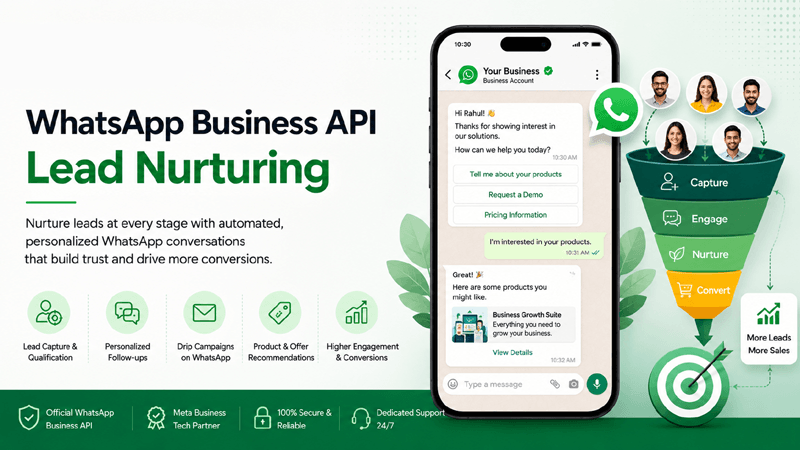
Quick Overview
What is WhatsApp Business API Lead Nurturing?
Understanding the mechanics of automated conversational sales on the world's most popular messaging app.
In today's fast-paced digital economy, acquiring a lead is only the first step. WhatsApp Business API Lead Nurturing is the strategic, automated process of engaging prospective customers with highly personalized, context-aware messaging sequences directly on WhatsApp. By leveraging the WhatsApp Business API through an enterprise platform like QuickMessage, businesses transition away from traditional, low-engagement email drip campaigns. Instead, they interact with leads in real-time, delivering immediate value, answering queries automatically, and systematically guiding prospects down the sales funnel.
Lead nurturing on WhatsApp transforms stagnant contact data into dynamic customer relationships. Whether your strategy involves sending an automated product catalog immediately after a website inquiry, executing an abandoned cart recovery sequence, or triggering a multi-day educational onboarding flow via the Flow Builder, WhatsApp sales automation guarantees that no lead falls through the cracks. It fundamentally enhances lead conversion by meeting the customer exactly where their attention is, backed by open rates that consistently exceed 90%.
Automated Sequences
Design multi-step drip campaigns that trigger automatically based on user behavior, time delays, or CRM status updates without manual intervention.
Seamless Integrations
Connect natively with your existing sales tech stack utilizing robust CRM Integrations to maintain perfect data consistency.
Accelerated Conversions
Dramatically reduce response times and shorten the overall sales cycle through instant, conversational commerce.
Strategic Importance
Why Lead Nurturing Matters
The traditional B2B and B2C sales playbook is evolving. Here is why proactive, automated lead management via WhatsApp is critical for sustainable enterprise growth.
Faster Responses
Lead decay occurs in minutes. Automated WhatsApp workflows guarantee that every inquiry receives an immediate, branded acknowledgment, capturing user momentum instantly and preventing them from migrating to competitors.
Better Customer Engagement
Unlike emails that sit unread in crowded promotions folders, WhatsApp messages boast unparalleled visibility. Interactive quick-reply buttons and catalog lists foster high-frequency, two-way conversational engagement.
Higher Conversion Rates
Statistically, thoroughly nurtured leads produce a 20% increase in sales opportunities compared to non-nurtured prospects. Delivering timely, relevant messaging directly correlates with sustainable bottom-line revenue growth.
Personalized Communication
Leverage deep demographic data, browsing history, and past interactions to deliver WhatsApp text messages tailored precisely to the individual prospect's unique pain points, elevating the customer experience.
Reduced Sales Cycle
By automatically educating prospects and qualifying their buying intent via chatbots, your human sales representatives spend their valuable time closing deals rather than answering rudimentary questions.
Increased Customer Trust
Operating strictly through the WhatsApp Business API with a verified green-tick profile provides institutional credibility, making prospects feel totally secure when interacting with your enterprise brand.
Improved Retention
Lead nurturing is not exclusively reserved for net-new acquisitions. The exact same WhatsApp infrastructure is utilized to onboard new clients, cross-sell relevant product tiers, and foster long-term brand loyalty. Continuous, value-driven communication prevents churn and maximizes Customer Lifetime Value (CLV).
Enterprise Features
A Comprehensive Lead Nurturing Toolkit
QuickMessage equips your sales and marketing teams with industry-leading modules to manage the entire WhatsApp customer journey flawlessly.
Automated Follow-ups
Set intelligent time delays to trigger follow-up sequences automatically if a lead remains unresponsive to initial outreach attempts.
Personalized Messaging
Inject dynamic variables (like Name, Company, Last Interaction) into bulk messages to ensure every text feels individually crafted.
CRM Integration
Maintain a single source of truth. Utilize our CRM Integrations to sync deal stages between your CRM and WhatsApp through a custom integration.
Lead Segmentation
Categorize prospects strictly based on intent level, geographic location, or product interest directly within your Contact Lists.
Scheduled Campaigns
Plan elaborate promotional pushes months in advance. Leverage Campaign Management for precise, calendar-based execution.
WhatsApp Templates
Submit and store pre-approved Meta message formats securely using the dedicated Templates module.
Rich Media Messages
Send high-quality brochures, demo videos, and PDF proposals directly from the centralized Media Library.
Flow Builder Automation
Construct intricate, visual chatbot journeys without writing a single line of code using the drag-and-drop Flow Builder interface.
Campaign Analytics
Measure success meticulously. Access detailed delivery metrics, read receipts, and click-through rates via comprehensive Analytics Reports.
Shared Team Inbox
When a lead requires human intervention, transition them smoothly to live agents using the collaborative Shared Team Inbox.
Lead Assignment
Distribute incoming prospects intelligently across your sales team using custom routing rules configured within Team Management.
Contact Management
Maintain pristine data hygiene. Automatically add, update, or remove customer tags to accurately reflect a contact's real-time journey stage.
The Automated Funnel
How It Works
From the initial digital touchpoint to the final transaction, visualize the six-step process for generating revenue on autopilot.
Step 1: Capture Leads
Acquire opt-ins dynamically through WhatsApp click-to-chat ads, website widgets, or QR codes. The moment a user interacts, they officially enter your verified WhatsApp Business API database securely.
Step 2: Segment Contacts
Automatically categorize incoming leads into specific Contact Lists based on the entry point source, product inquiry type, or geographical data collected during the initial automated greeting.
Step 3: Create Automated Workflow
Utilize the Flow Builder to visually design a multi-day communication path. Set logic conditions to branch the conversation flow depending on the user's interactive button responses or silences.
Step 4: Send Personalized Messages
Trigger Meta-approved Templates sequentially. Dispense rich educational content, product demos, or case studies tailored specifically to the segment's demonstrated interests.
Step 5: Track Customer Engagement
Monitor campaign health comprehensively. Review Analytics Reports daily to determine which message templates yield the highest read rates, button clicks, and positive replies.
Step 6: Convert Leads into Customers
Transition highly qualified, warm leads directly to your human sales team via the Shared Team Inbox to finalize the transaction, negotiate pricing, and seamlessly close the deal.
Value Proposition
Benefits Section
Effective lead nurturing on the QuickMessage platform does not just improve your bottom line—it dramatically enhances the buying experience for your prospective clients.
Business Benefits
- Maximize ROI on Marketing Spend: Stop losing leads generated from expensive ads. Ensure every ad click enters a structured nurturing workflow immediately.
- Scale Sales Efforts: Engage thousands of leads simultaneously across multiple time zones without having to hire a massive outbound sales development team.
- Data-Driven Decisions: Utilize deep analytical insights from Analytics Reports to continuously refine and optimize your messaging strategies for better yield.
- Reduce Customer Acquisition Cost (CAC): Consistently higher lead conversion rates naturally drive down the average enterprise cost required to acquire a net-new customer.
Customer Benefits
- Frictionless Experience: Receive relevant product information instantly on their favorite messaging app without navigating clunky websites or checking spam folders.
- Contextual Relevance: Avoid generalized spam. Customers receive communication strictly tailored to the products or services they actively expressed interest in.
- 24/7 Availability: Automated chat flows provide instant answers to common questions regardless of time zones, holidays, or typical business hours.
- Seamless Transitions: Experiencing a perfectly smooth handoff from an automated bot to a knowledgeable human agent when complex support or negotiation is required.
Versatile Applications
Industry Use Cases
Discover how diverse sectors leverage the WhatsApp Business API to automate customer acquisition and scale their operations.
Education
Nurture student inquiries into course enrollments via prospectus sharing.
Healthcare
Convert preliminary health inquiries into confirmed clinical appointments safely.
Real Estate
Automate property brochure delivery and schedule on-site visits instantly.
Retail
Re-engage window shoppers with highly personalized catalog recommendations.
Ecommerce
Recover abandoned carts by triggering automated discount sequences dynamically.
Insurance
Guide prospects through complex policy calculations and automated quote generations.
Finance
Qualify loan applicants rapidly and streamline the initial document collection phase.
Travel
Inspire wanderlust by sending curated itinerary proposals based on destination queries.
Hospitality
Upsell room upgrades and spa packages autonomously prior to guest arrival dates.
Automotive
Schedule dealership test drives and distribute detailed vehicle specification sheets.
IT Services
Share detailed technical case studies to effectively warm up high-ticket B2B leads.
SaaS Companies
Onboard freemium users, highlight platform features, and prompt paid upgrades seamlessly.
The Enterprise Standard
Why Choose QuickMessage
Join thousands of high-growth companies worldwide utilizing the ultimate enterprise WhatsApp communication platform.
Official Meta Partner
Rely on a certified Meta Business Tech Partner ensuring absolute 100% compliance and reliability.
Official Solution Provider
Access premium WhatsApp Business Solution Provider (BSP) infrastructure directly via our platform.
Official WhatsApp API
Connect securely to the robust WhatsApp Business API with zero technical overhead required.
Campaign Management
Utilize comprehensive Campaign Management tools for bulk scheduling and mass broadcasts.
Flow Builder
Design automated sales pathways effortlessly with our intuitive drag-and-drop Flow Builder technology.
CRM Integration
Synchronize data across your tech stack securely using advanced CRM Integrations ensuring alignment.
Shared Team Inbox
Empower sales teams to collaborate efficiently within a centralized Shared Team Inbox interface.
Advanced Analytics
Track and optimize conversion funnels rigorously through dynamic, real-time Analytics Reports.
Secure Messaging
Benefit from strict enterprise-grade security protocols, end-to-end encryption, and comprehensive GDPR compliance.
Scalable Platform & Dedicated Support
Architected on AWS infrastructure to handle millions of interactions simultaneously without latency. Plus, gain access to expert onboarding, continuous technical guidance, and dedicated account management to ensure your sales automation strategy never falters.
Get Your Answers
Frequently Asked Questions
Everything you need to know about scaling your sales pipeline with automated WhatsApp Lead Nurturing.
1. How exactly does WhatsApp lead nurturing differ from email nurturing?
Unlike traditional email campaigns—which constantly suffer from low deliverability, aggressive spam filters, and open rates commonly below 20%—WhatsApp lead nurturing leverages the WhatsApp Business API to achieve open rates frequently exceeding 90%. Furthermore, WhatsApp facilitates immediate, two-way conversational engagement using interactive buttons, whereas emails tend to be static, one-way communication broadcasts that inevitably delay the sales conversion cycle.
2. Can I automate follow-up messages based on specific user behavior?
Yes, absolutely. By utilizing the QuickMessage Flow Builder, you can design highly sophisticated automation sequences that trigger specifically based on how a user interacts. For example, if a lead clicks a specific button indicating interest in a "Premium Tier," the system will automatically route them to a specialized follow-up sequence, ensuring highly relevant engagement tailored strictly to their demonstrated intent.
3. Do I need to get message templates approved for lead nurturing campaigns?
Yes. Because you are utilizing the Official WhatsApp infrastructure, all business-initiated outreach (messages sent outside the 24-hour customer service window) must use pre-approved Meta message formats. Fortunately, the QuickMessage Templates module allows you to easily draft, submit, and manage these marketing templates directly from your dashboard, with most approvals granted by Meta in mere minutes.
4. How does CRM integration enhance the lead nurturing process?
Robust CRM Integrations allow your WhatsApp platform to synchronize data bidirectionally with your CRM through a custom integration. This means when a lead's stage changes in your CRM (e.g., from "New Lead" to "Qualified"), it can automatically trigger a specific WhatsApp nurturing campaign. Conversely, data collected via WhatsApp chat automatically populates back into your CRM, maintaining pristine records.
5. Is it possible to personalize automated bulk WhatsApp messages?
Definitely. Personalization is fundamental to achieving high sales conversion rates. When utilizing Campaign Management features, you can insert dynamic variables into your message templates. This allows the system to automatically populate data such as the contact’s first name, company name, or previous purchase history, ensuring mass campaigns still feel intimately tailored to the individual prospect.
6. How can I track the success and ROI of my nurturing campaigns?
Success tracking is managed entirely through comprehensive Analytics Reports. The dashboard provides granular visibility into critical metrics, including message delivery rates, read receipts, button click-through performance, and overall campaign conversion ratios. This empirical data empowers marketing and sales teams to continuously optimize their messaging strategies and definitively prove return on investment.
7. Are there pricing costs associated with sending automated follow-ups?
Yes. Because QuickMessage utilizes the WhatsApp Business API, messaging follows Meta's per-message pricing: each delivered marketing message is charged at the rate for the customer's country. You can review our transparent subscription models and expected platform usage costs directly on our Pricing page.
8. What happens to compliance and GDPR when capturing WhatsApp leads?
Compliance is an absolute priority. Enterprises must collect explicit, verifiable opt-in consent from users (via website forms, checkboxes, or initial inbound messages) before adding them to a proactive nurturing sequence. As an Official Meta Business Tech Partner, QuickMessage adheres strictly to Meta's Commerce Policies and global privacy standards like GDPR, ensuring your messaging infrastructure is thoroughly protected.
9. How do human sales agents take over from an automated chatbot?
When an automated flow reaches its natural conclusion, or if a prospect explicitly requests human assistance, the system seamlessly transitions the active chat into the Shared Team Inbox. From there, your human sales representatives can view the entire historical context of the conversation and take over the chat to close the deal personally.
10. Can I send rich media like PDFs or videos during the nurturing phase?
Absolutely. Rich media drastically improves engagement. By utilizing the QuickMessage Media Library, businesses can effortlessly attach product demonstration videos, high-resolution image catalogs, or detailed PDF proposals directly into their automated message templates to educate and persuade prospective clients effectively.
11. How does lead segmentation work on the QuickMessage platform?
Effective nurturing requires precise targeting. The Contact Lists feature allows you to categorize leads based on demographic information, behavioral intent, or specific lead sources. You can apply dynamic tags to user profiles, ensuring that your subsequent marketing broadcasts only reach the most relevant and highly qualified audience segments.
12. How does WhatsApp automation reduce the overall sales cycle?
By immediately providing prospects with essential information, instantly answering FAQs, and systematically pre-qualifying leads via automated conversational flows, sales representatives no longer waste time on repetitive introductory tasks. They step in only when a lead is highly warmed and actively ready to purchase, accelerating final sales conversion exponentially.
13. Can we assign different leads to specific sales representatives?
Yes, enterprise workflows demand structural organization. Through comprehensive Team Management configurations, administrators can establish specific routing rules. This ensures that when a nurtured lead is ready for human interaction, they are automatically assigned to the appropriate sales agent based on territory, expertise, or current workload.
14. What are the best practices for preventing users from blocking our number?
To maintain a high quality rating on the WhatsApp Business API, businesses must strictly honor opt-ins, avoid sending overly frequent or generic spam, and consistently provide clear, valuable information. Providing a distinct, frictionless opt-out mechanism within your messages also significantly reduces the likelihood of users manually blocking the business account.
15. How long does it take to deploy a WhatsApp lead nurturing system?
Because QuickMessage functions as a centralized, cloud-based SaaS platform, deployment is remarkably swift. Once your Meta business account is verified and connected, teams can begin importing contacts, drafting templates, and designing basic automated flows within a single afternoon. To explore deployment timelines specifically tailored to your organizational needs, please Book Demo with our enterprise specialists.
Transform Your Sales Pipeline Today
Join industry leaders automating their lead nurturing with QuickMessage. Stop letting valuable prospects slip away. Partner with an Official Meta Business Tech Partner to deploy enterprise-grade automation and convert more leads directly on WhatsApp.


