

Automate WhatsApp Event & Registration Reminders
Maximize attendance and eliminate no-shows with a powerful WhatsApp Business API event reminder. Send timely registration confirmations, tickets, and schedule updates directly to your attendees.
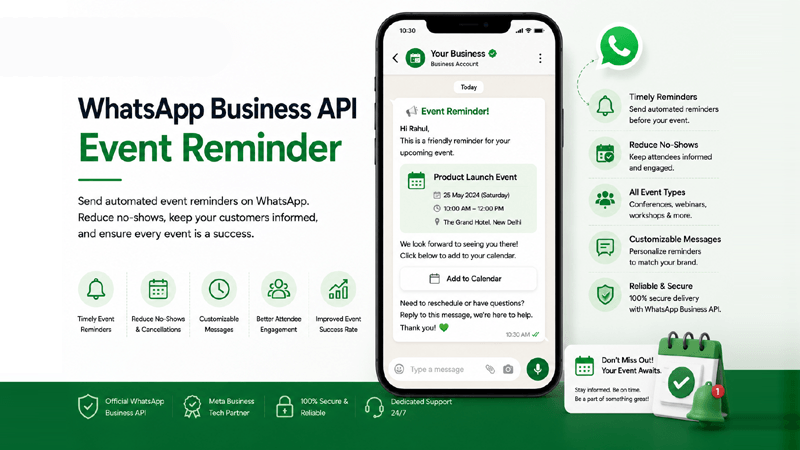
What is a WhatsApp Business API Event Reminder?
Discover how automated event and registration reminders via the WhatsApp Business API transform your attendance rates and customer engagement.
Direct Attendee Notifications
A WhatsApp Business API Event Reminder is an automated alert sent directly to a registrant's phone. Unlike emails that get lost in spam folders, WhatsApp notifications ensure your event details, location maps, and start times are seen instantly, maximizing visibility and keeping your brand top-of-mind.
How Automation Works
By connecting your booking software or CRM to QuickMessage, you can map specific triggers. Once a user registers, the system automatically schedules a sequence of messages—such as a booking confirmation, a 24-hour preparation reminder, and a 1-hour "starting soon" alert.
Why Businesses Use It
The primary goal is to drastically reduce no-show rates. When attendees receive an automated WhatsApp Webinar Reminder or offline event ticket, they are significantly more likely to show up. It also builds trust, establishes professional communication, and provides an avenue for rapid two-way support.
Why Automated Event Reminders Matter
Sending a WhatsApp Event Reminder is crucial to reduce no-shows, increase event attendance, and build a better attendee experience from registration to the live session.
Reduce No-Shows
No-shows cost businesses time and revenue. By implementing automated WhatsApp Event Notifications, you provide highly visible nudges that keep your seminar, medical appointment, or webinar top-of-mind, drastically minimizing absent attendees.
Increase Event Attendance
A gentle nudge an hour before the event begins creates a sense of urgency. With high open rates inherent to messaging platforms, utilizing a WhatsApp Webinar Reminder ensures your audience transitions from registrants to active participants.
Improve Customer Engagement
Reminders aren't just one-way blasts. They open a dialogue. Attendees can ask questions about parking, prerequisites, or session topics by replying directly to your reminder message, fostering immediate engagement.
Send Timely Reminders
Timing is everything in event management. The WhatsApp Business API allows you to schedule precise notifications—whether that’s a week before for travel prep or 15 minutes before a virtual session starts.
Share Event Updates Instantly
If a speaker cancels, a session room changes, or weather delays an outdoor gathering, you need to inform everyone immediately. WhatsApp Event Messaging enables instant, bulk broadcasting of critical updates to all registrants.
Simplify Registration Communication
Sending a WhatsApp Registration Reminder ensures attendees have their tickets, QR codes, and itineraries readily accessible in their chat history. No more frantic email searching at the registration desk.
Build a Better Attendee Experience
From the moment they register to the post-event feedback survey, providing clear, concise, and helpful communications via WhatsApp elevates your brand's professionalism and ensures a frictionless, premium attendee experience.
Advanced Event Notification Features
Power your event messaging with robust automation tools built on the WhatsApp Business API. Explore features designed to streamline registration.
Automated Event Reminders
Set precise triggers to dispatch alerts days, hours, or minutes before an event kicks off, ensuring completely hands-free communication.
Registration Confirmations
Acknowledge sign-ups instantly. Deliver peace of mind by confirming their spot with an automated WhatsApp Registration Reminder.
Event Schedule Notifications
Broadcast daily itineraries for multi-day conferences so attendees know exactly which sessions, keynotes, or workshops are happening next.
Personalized Reminder Messages
Use data from your Contact Lists to address registrants by name and tailor the message based on their specific ticket type.
Dynamic Template Variables
Easily inject dynamic fields like event date, time, location, and personalized joining links into your pre-approved message Templates.
Rich Media Invitations
Send visually appealing digital invites with speaker photos or event promotional videos stored securely in your Media Library.
QR Code & Ticket Sharing
Deliver scannable PDF tickets and unique QR codes directly to WhatsApp for rapid, paperless on-site check-in.
Location & Map Links
Include interactive Google Maps or Apple Maps pins in your WhatsApp Seminar Reminder so attendees can navigate to your venue effortlessly.
Calendar Reminder Links
Embed "Add to Calendar" links within the chat, enabling users to sync your event directly with their Google or Outlook calendars.
Flow Builder Automation
Design complex communication paths—such as post-event surveys or RSVP collections—using our intuitive visual Flow Builder.
Deep CRM Integration
Sync registrant data bidirectionally. Keep attendee statuses updated in real-time with powerful CRM Integrations.
Campaign Management
Schedule and broadcast bulk announcements to thousands of registrants simultaneously using our Campaign Management tools.
Analytics & Reports
Monitor read receipts, delivery rates, and link clicks to gauge attendee interest utilizing robust Analytics & Reports.
Shared Team Inbox
Manage attendee queries collaboratively. Route questions to support staff via the Shared Team Inbox.
Multi-language Templates
Cater to global audiences by automatically sending WhatsApp Event Notifications in the attendee's preferred language.
How Automated Event Reminders Work
Seamlessly integrate the WhatsApp Business API event reminder system into your existing registration flow.
Customer Registers for an Event
The process initiates the moment a user submits a registration form on your website, books a ticket via an external portal, or secures a webinar spot.
Capture Registration Details
Via API integration, the attendee's name, phone number, ticket type, and event timestamp are instantly securely captured and pushed into your QuickMessage ecosystem.
Schedule Reminder Workflow
The system evaluates the event date and automatically queues a series of WhatsApp Attendance Reminders based on your predefined rules (e.g., immediate confirmation, 24-hour reminder, 1-hour alert).
Send WhatsApp Reminder
When the scheduled time arrives, the WhatsApp Business API fires a personalized, Meta-approved template directly to the user’s smartphone without any manual intervention.
Share Event Details & Tickets
The reminder includes actionable items: PDF e-tickets, QR codes for easy check-in, Zoom joining links, or interactive buttons to confirm or cancel attendance.
Track Attendance & Engagement
Monitor message delivery, read status, and user replies in real-time. Post-event, trigger an automated feedback survey to complete the full engagement cycle.
Maximize Event Success
Discover the dual benefits of implementing automated WhatsApp registration reminders for both your enterprise operations and your attendees.
Business Benefits
- Reduced No-Shows: Consistent, visible reminders ensure registrants don't forget, directly protecting your event ROI.
- Automated Reminder Scheduling: Eliminate manual SMS and email follow-ups. The WhatsApp Business API handles timing perfectly.
- Higher Attendance Rates: Push notifications in a personal messaging app yield the highest possible conversion from sign-up to actual attendance.
- Cost Efficiency: Consolidating communications through an automated workflow saves significant administrative labor costs.
Customer Benefits
- Better Event Communication: Attendees receive critical updates instantly, such as venue changes, parking info, or delay alerts.
- Improved Customer Experience: Having tickets, QR codes, and schedules in their WhatsApp chat eliminates the frustration of searching through email inboxes.
- Increased Event Engagement: Interactive messages allow users to RSVP, ask questions, or download preliminary materials effortlessly.
- Frictionless Check-in: Presenting a digital ticket on WhatsApp at the registration desk makes the physical entry process swift and professional.
Event Reminders Across Industries
From healthcare to real estate, see how diverse sectors utilize automated notifications to streamline their event operations.
Corporate Events
Send CEO keynote schedules, networking session maps, and ticket QRs securely.
Webinars
Deploy a WhatsApp Webinar Reminder with joining links exactly 15 minutes before going live.
Education
Notify students and parents about parent-teacher meetings, exams, or graduation events.
Training Institutes
Ensure high attendance for certification courses with automated WhatsApp Seminar Reminders.
Healthcare
Reduce no-shows for medical conferences, blood drives, and virtual telemedicine appointments.
Hotels
Remind guests of special in-house events, spa reservations, or dining experiences.
Travel
Send tour group meet-up times, flight itineraries, and excursion alerts.
Real Estate
Send timely reminders to potential buyers for open houses or exclusive property viewings.
Banking
Remind VIP clients of exclusive wealth management seminars or advisory appointments.
Insurance
Notify agents and clients of financial planning workshops and policy renewal meetings.
Retail Promotions
Alert loyal customers about exclusive VIP store launches or flash sale events.
Government Programs
Broadcast reminders for public hearings, community town halls, or immunization drives.
Why QuickMessage for Event Reminders?
Leverage our status as an Official Meta Business Tech Partner to securely scale your WhatsApp event messaging and automation infrastructure.
Official Meta Business Tech Partner
We maintain strict compliance and technical standards with Meta, guaranteeing high deliverability for your event alerts.
Official WhatsApp BSP
As a verified Business Solution Provider, we offer rapid provisioning and direct access to the WhatsApp Business API.
Campaign Management
Use our Campaign Management suite to blast targeted event updates to lists of thousands instantly.
Flow Builder
Create intricate RSVP workflows and dynamic reminders using our intuitive drag-and-drop Flow Builder.
CRM Integration
Sync attendees from your CRM or booking tools through CRM Integrations.
Shared Team Inbox
Empower your event staff to answer attendee questions collaboratively in the Shared Team Inbox.
Media Library
Store PDF brochures, video teasers, and speaker images securely within your Media Library for quick deployment.
Analytics & Reports
Track RSVP statuses and message read receipts in real-time with comprehensive Analytics & Reports.
Enterprise Security
Registrant data is handled with end-to-end encryption and enterprise-grade privacy protection protocols.
Team Management
Assign roles for event coordinators and marketers securely through granular Team Management permissions.
Dedicated Support
Access specialized technical support to assist you with API setups, workflow creation, and Meta template approvals.
Frequently Asked Questions
Find expert answers on setting up a WhatsApp Business API event reminder, automating event confirmations, and integrating with your CRM.
1. What is a WhatsApp Business API Event Reminder?
A WhatsApp Business API Event Reminder is an automated notification sent to attendees' WhatsApp accounts prior to a scheduled event, webinar, or appointment. By leveraging the official WhatsApp Business API, organizations can programmatically trigger personalized alerts containing tickets, maps, and joining links. Because WhatsApp is checked multiple times daily, these notifications guarantee vastly higher visibility and engagement than traditional email, ultimately reducing no-shows and ensuring registrants have all necessary information instantly accessible.
2. How do automated event and registration reminders work?
The process works through API integration. When a user signs up on your website or ticketing platform, their data is instantly transferred to QuickMessage. Our system then reads the event date and queues a sequence of messages based on predefined rules—such as an immediate WhatsApp Registration Reminder acknowledging the booking, followed by automated nudges 24 hours and 1 hour before the event. This entirely automated workflow eliminates manual follow-ups and ensures timely, accurate communication.
3. Why should we use WhatsApp instead of Email for event reminders?
WhatsApp vastly outperforms email in both open rates and speed. Emails often languish in spam folders or promotions tabs, resulting in low visibility and high no-show rates. WhatsApp messages achieve an open rate exceeding 90%, typically read within minutes of delivery. Furthermore, a WhatsApp Attendance Reminder provides an interactive experience; users can tap quick reply buttons to confirm attendance, cancel, or ask questions, making it a superior channel for critical, time-sensitive event communication.
4. Can I send PDF tickets and QR codes via WhatsApp?
Absolutely. The WhatsApp Business API supports rich media natively. You can automatically generate and attach PDF tickets, scannable QR codes, or digital passes to your event reminders. This means attendees simply open their chat history at your event’s registration desk for a fast, paperless check-in. This friction-free experience greatly enhances the attendee’s perception of your brand's professionalism and operational efficiency.
5. Are message templates required for event reminders?
Yes, according to Meta’s policies, any business-initiated message sent outside the standard 24-hour customer service window must use a pre-approved Message Template. Fortunately, QuickMessage simplifies this by providing highly converting, compliant event reminder templates. You can customize these templates with dynamic variables like {{attendee_name}}, {{event_time}}, and {{location}}. Once submitted through our platform, templates are usually approved by Meta within minutes, ready for automated deployment.
6. How can we manage attendees who ask questions in response?
When an attendee replies to an automated reminder with a question (e.g., "Is parking available?"), the conversation is immediately routed to QuickMessage's Shared Team Inbox. From there, your event coordinators, support agents, or sales reps can collaborate to provide a swift, human response. This seamless transition from automation to live support ensures that your attendees receive the personalized assistance they need, increasing overall satisfaction.
7. Does the platform integrate with our existing CRM or ticketing system?
Yes. QuickMessage offers robust APIs and custom CRM Integrations that allow it to connect with your CRM, event platform or custom-built backend system. This deep integration ensures that when a registration occurs in your primary system, the contact data is instantly mirrored in QuickMessage, automatically triggering the necessary event reminder workflows without any manual data entry or risk of human error.
8. Can we send location maps in the reminders?
Definitely. Including accurate location data is a best practice for physical events. You can embed interactive Google Maps or Apple Maps URLs directly within your WhatsApp Seminar Reminder. When the attendee taps the link, it seamlessly opens their preferred navigation app, providing turn-by-turn directions to your venue. This proactive communication eliminates confusion, prevents attendees from getting lost, and significantly reduces inbound queries regarding the event location.
9. How do we collect RSVPs using WhatsApp?
Collecting RSVPs is incredibly efficient using WhatsApp's interactive buttons. You can send a broadcast message asking attendees to confirm their attendance, featuring Quick Reply buttons like "Yes, I'll be there" and "No, I can't make it." When a user taps a button, QuickMessage’s platform logs the response instantly. Using our Flow Builder, a positive RSVP can trigger ticket delivery, while a negative RSVP can automatically open that seat up for a waitlist candidate.
10. Can we schedule messages for different time zones?
Yes, managing time zones is critical for global webinars and virtual events. Through the WhatsApp Business API integration, our scheduling engine accounts for the attendee's specific time zone or the local time of the event. This ensures that a WhatsApp Webinar Reminder scheduled for "1 hour before" fires precisely at the correct localized time, preventing early disruptions or late notifications that could cause the attendee to miss the session.
11. Are these notifications secure and compliant?
Absolutely. Security is a primary feature of the WhatsApp network, which provides end-to-end encryption for all communications. As an Official Meta Tech Partner, QuickMessage adheres to rigorous data protection standards, including GDPR compliance. Businesses must secure active opt-in consent from users during the registration process to receive WhatsApp Event Notifications, ensuring that all communications are legally compliant, secure, and respectful of attendee privacy.
12. Can we broadcast emergency event updates?
Yes, crisis communication is a vital use case. If an event is suddenly relocated due to weather, or a keynote speaker is delayed, you can use our Campaign Management tools to broadcast an urgent alert to all registrants simultaneously. Because WhatsApp push notifications are delivered instantly to their home screens, you can guarantee that the critical update is read immediately, mitigating confusion and managing the crowd effectively.
13. How do we measure the success of our event reminders?
QuickMessage offers a detailed Analytics & Reports dashboard that tracks the entire lifecycle of your messaging. You can view metrics such as the total number of reminders dispatched, successful delivery rates, read receipts, and user reply rates. By cross-referencing this data with actual check-in numbers, event organizers can calculate exact RSVP conversion rates and tweak timing strategies for future events to continuously improve attendance.
14. What happens after the event concludes?
The engagement shouldn't end when the event does. You can automate post-event workflows via WhatsApp to thank attendees for coming, share presentation slides securely from your Media Library, or request a feedback review using an automated CSAT survey. This continuous engagement loop builds community, solidifies brand loyalty, and provides valuable insights that help you plan more successful events in the future.
15. Why do we need the official API instead of the standard app?
The standard WhatsApp Business app is designed for small, manual operations and strictly limits bulk messaging. To automate triggers from a CRM, send thousands of compliant WhatsApp Event Messaging alerts simultaneously, handle rich template variables, and utilize multiple team members, you require the official WhatsApp Business API. QuickMessage provides the enterprise-grade infrastructure to leverage this API securely, reliably, and at mass scale without requiring complex coding on your end.
Automate Your Event Reminders Today
Boost attendance, reduce no-shows, and deliver a premium attendee experience with automated WhatsApp Business API event notifications from QuickMessage.
Never Miss Another Attendee
Transition from easily ignored emails to highly visible messaging. Leverage the WhatsApp Business API to send tickets, secure RSVPs, and guarantee packed rooms. Explore our Pricing plans to find the right automation scale for your enterprise.


