

Keep your customers informed in real-time with automated WhatsApp Business API Shipping Updates. Reduce support tickets and enhance the post-purchase journey today.
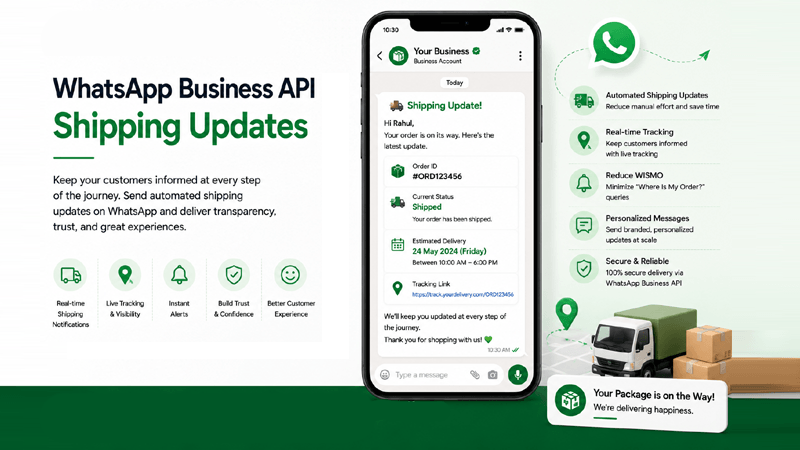
What Are Automated Shipping Notifications?
Learn how WhatsApp Business API Shipping Updates transform logistics communication and empower businesses to send instant real-time shipping updates.
What Are They?
WhatsApp Shipping Updates are programmatic notifications sent directly to a customer's phone during the post-purchase journey. Instead of relying on easily missed emails, these updates deliver essential logistics data—like tracking numbers and ETAs—into a high-engagement messaging app.
How They Work
Through seamless API connectivity, your fulfillment software communicates with QuickMessage. When an order status changes (e.g., "Dispatched"), the platform instantly triggers automated shipping notifications using pre-approved message templates, without requiring manual intervention.
Why Businesses Use Them
Modern consumers demand logistics transparency. Sending proactive WhatsApp Shipment Tracking alerts significantly reduces "Where is my order?" queries, builds brand trust, and transforms standard deliveries into exceptional customer experiences.
The Impact of Real-Time Shipment Visibility
Discover why proactive WhatsApp Shipping Notifications are critical for reducing customer anxiety and elevating post-purchase satisfaction with the WhatsApp Business API.
Real-Time Shipment Visibility
Give your customers immediate, accurate access to their parcel's location. By pushing updates straight to their phones, you eliminate the need for them to manually check courier websites, delivering a frictionless tracking experience.
Better Customer Communication
WhatsApp boasts a 98% open rate. Engaging your customers on a channel they check daily ensures that your critical WhatsApp Logistics Updates are actually seen, drastically outperforming traditional email channels.
Reduced "Where is my shipment?" Inquiries
Proactive communication preempts customer anxiety. By automating tracking updates, you deflect a massive volume of routine inbound support tickets, freeing up your team to handle complex queries.
Improved Delivery Transparency
Unexpected delays happen. Utilizing WhatsApp Courier Notifications to inform customers instantly about weather delays or logistical hiccups maintains transparency and preserves your brand's integrity.
Higher Customer Satisfaction
A smooth, communicative delivery process directly impacts your CSAT scores. When buyers feel informed and respected during the fulfillment phase, their overall satisfaction with your brand soars.
Increased Customer Trust
Reliable, consistent updates build immense trust. When an enterprise brand reliably delivers automated shipping notifications, it reassures buyers that their transaction was secure and professionally managed.
Better Post-Purchase Experience
The post-purchase journey is where brand loyalty is cemented. Superior WhatsApp Shipment Tracking transforms a standard transactional delivery into a premium experience that encourages repeat business and positive reviews.
Enterprise Shipping Notification Features
Unlock advanced WhatsApp Shipment Tracking capabilities via the WhatsApp Business API to keep your buyers informed at every step of the logistics journey.
Automated Shipping Notifications
Set event-based triggers to fire WhatsApp alerts automatically the second an order's status updates in your backend system.
Shipment Confirmation Messages
Reassure customers instantly by sending a confirmation notification containing their order number and expected processing times.
Dispatch Notifications
Send an immediate alert when the package leaves the warehouse, letting the customer know their order is officially in transit.
Courier Assignment Updates
Provide transparency by sharing the specific logistics partner handling the delivery, along with the driver's contact details if applicable.
Live Shipment Tracking
Integrate real-time tracking APIs to provide step-by-step milestone updates straight to the customer's WhatsApp inbox.
Tracking Link Sharing
Embed clickable buttons in your messages that seamlessly route users to the courier's live map or your branded tracking portal.
Estimated Delivery Updates
Send proactive dynamic alerts if the ETA changes, managing expectations gracefully during unexpected logistical delays.
Rich Media Support
Attach digital PDF invoices, packing slips, or unboxing guide videos securely through the Media Library.
Dynamic Message Templates
Personalize alerts with dynamic variables (e.g., {{name}}, {{tracking_number}}) via approved Templates.
Flow Builder Automation
Design intricate conversational routes using our drag-and-drop Flow Builder to handle rescheduling or address changes.
CRM Integration
Sync tracking data with Shopify, or with other platforms through custom CRM Integrations.
Campaign Management
Notify large segments of customers about bulk shipping delays or warehouse issues instantly using Campaign Management.
Analytics & Reports
Monitor message delivery rates, read receipts, and tracking link clicks seamlessly with Analytics & Reports.
Shared Team Inbox
If a customer replies with a shipping complaint, route the chat instantly to a human agent in the Shared Team Inbox.
Multi-language Notifications
Use smart Contact Lists data to trigger shipping alerts in the customer's native language, enhancing global accessibility.
The Automated Shipping Communication Flow
See the exact step-by-step process of how WhatsApp Shipping Alerts trigger seamlessly from your warehouse to the customer's phone using the WhatsApp Business API.
Order is Packed
The fulfillment center scans the items and marks the order as packed in the backend system, preparing the logistics data for synchronization.
Shipment is Assigned to Courier
An airway bill (AWB) is generated. The system securely passes the courier details and tracking number to the QuickMessage platform via API webhooks.
Shipping Confirmation Sent
QuickMessage automatically fires a personalized WhatsApp Dispatch Notification, letting the customer know their package has officially left the facility.
Real-time Shipment Tracking
The customer taps the embedded native tracking button in the WhatsApp message to view live map updates and courier progress without entering passwords.
Delivery Status Updated
If there is an exception or the package is marked "Out for Delivery," interim WhatsApp Logistics Updates are triggered to manage customer expectations.
Customer Receives Final Delivery Notification
Upon successful drop-off, a final WhatsApp confirmation is sent. This message can also double as a prompt to collect product reviews or CSAT scores.
Maximize Value for Business and Buyers
Implement WhatsApp Dispatch Notifications via the WhatsApp Business API to unlock operational efficiency while delivering a stronger, more transparent customer experience.
Business Benefits
- Faster Customer Communication: Real-time API triggers ensure that your logistics data reaches the customer seconds after the event occurs.
- Fewer Support Tickets: Automating answers to tracking questions slashes support volumes, lowering operational costs significantly.
- Automated Shipping Workflows: Remove human error by relying on webhook-based integrations that send notifications perfectly every time.
Customer Benefits
- Better Logistics Transparency: Shoppers appreciate knowing exactly where their package is without navigating clunky carrier websites.
- Improved Customer Satisfaction: A smooth post-purchase communication cycle creates a sense of security, directly increasing CSAT scores.
- Stronger Customer Loyalty: A brand that respects a customer's time by proactively providing updates wins their repeat business over silent competitors.
Shipping Updates Across Industries
See how diverse sectors leverage WhatsApp Parcel Tracking to keep their supply chains transparent and customers perfectly informed.
Ecommerce
Provide D2C brands with end-to-end automated retail shipping tracking.
Retail
Notify customers when ship-to-store orders have arrived for pickup.
Logistics
Send freight forwarding status and container tracking to B2B clients.
Courier Services
Deploy out-for-delivery alerts and live map links to end recipients.
Healthcare
Provide secure updates for medical device and equipment deliveries.
Pharmacy
Track critical prescription dispatches with high privacy compliance.
Electronics
Ensure high-value tech item shipments are tracked securely to completion.
Fashion
Enhance the unboxing anticipation with branded delivery notifications.
Furniture
Coordinate bulky item shipments and scheduled delivery timeframes.
Wholesale
Update distributors on pallet shipments and regional warehouse dispatches.
Manufacturing
Track raw material deliveries for supply chain inventory synchronization.
Food & Beverage
Provide real-time updates for perishable goods and cold-chain shipments.
Your Enterprise WhatsApp Platform
Partner with an Official Meta Business Tech Partner to scale your WhatsApp Courier Notifications securely and reliably.
Official Meta Tech Partner
We maintain the highest tier of Meta compliance, ensuring your notifications are delivered reliably without interruption.
Official WhatsApp BSP
Gain direct access to the WhatsApp Business API for fast provisioning and superior messaging throughput.
Campaign Management
Utilize robust Campaign Management tools to broadcast logistics delays or updates to massive audience segments.
Flow Builder
Design visual, interactive chatbot paths for return shipping requests using our intuitive Flow Builder.
CRM Integration
Connect Shopify, or proprietary ERPs through custom CRM Integrations framework.
Shared Team Inbox
Resolve complex shipping issues collaboratively by routing chats to live agents in the Shared Team Inbox.
Media Library
Attach digital packing slips securely to messages by hosting them centrally in the Media Library.
Analytics & Reports
Track read rates, message delivery success, and ROI seamlessly with comprehensive Analytics & Reports.
Enterprise Security
Your customer shipping data is protected by end-to-end encryption and enterprise-grade privacy protocols.
Team Management
Control platform access for logistics managers and support staff securely through granular Team Management permissions.
Dedicated Support
Benefit from expert onboarding, API integration assistance, and priority troubleshooting from our enterprise support team.
Frequently Asked Questions
Get expert answers about deploying WhatsApp Business API Shipping Updates, integrating your CRM, and automating shipment tracking.
1. What are WhatsApp Business API Shipping Updates?
WhatsApp Business API Shipping Updates are automated alerts sent directly to a customer's WhatsApp account regarding their parcel's logistics journey. By utilizing the official WhatsApp Business API, enterprise businesses can programmatically trigger messages for order dispatch, courier assignment, live tracking, and final delivery. This transitions post-purchase communication away from low-engagement emails into an instant, high-visibility messaging app, dramatically improving the customer experience and reducing inbound queries about shipment statuses.
2. How does WhatsApp shipment tracking actually work?
The tracking system operates via API webhooks. Your fulfillment software or eCommerce platform (like Shopify) communicates directly with QuickMessage. When an event occurs—such as generating an airway bill or a package leaving a sorting facility—your system sends a data payload. QuickMessage instantly parses this data, inserts variables like the tracking number into a pre-approved message Template, and dispatches the alert via WhatsApp seamlessly without any manual data entry.
3. Why are WhatsApp courier notifications superior to email?
Email open rates have plummeted, often hovering around 20%, with shipping notifications frequently buried in promotional tabs. In contrast, WhatsApp boasts an open rate of over 95%. Because customers check WhatsApp constantly, shipping updates are seen immediately. Furthermore, WhatsApp supports interactive buttons, allowing users to tap a "Track Package" button that routes them directly to a live map, eliminating the friction of copying and pasting tracking numbers from emails into carrier websites.
4. Do we need Meta's approval to send shipping alerts?
Yes. According to Meta’s commerce policies, any message initiated by a business outside the 24-hour customer service window must use a pre-approved template. Fortunately, shipping and dispatch alerts fall under the "Utility" category, which has a very high and fast approval rate. QuickMessage provides an intuitive dashboard to create these templates—complete with dynamic variables for names and tracking links—and submit them to Meta for approval, usually granted within minutes.
5. Can we integrate these updates with our existing CRM?
Absolutely. QuickMessage is engineered for enterprise interoperability. Through our robust API and custom CRM Integrations, you can connect your WhatsApp communication layer to Shopify, or to your CRM or logistics ERP through a custom integration. This ensures that order data, tracking links, and customer details remain perfectly synchronized across your entire technology stack, automating the entire workflow seamlessly.
6. How do shipping updates reduce "WISMO" tickets?
"Where is my order?" (WISMO) queries often account for 30% to 50% of an eCommerce brand's support volume. By implementing proactive WhatsApp Shipping Updates, you push the answers to the customer before they have to ask. Sending automated alerts for dispatch, out-for-delivery, and final delivery ensures the customer is always aware of their parcel's location. This proactive transparency successfully deflects thousands of routine support tickets, saving immense operational costs.
7. What happens if a customer replies to a tracking message?
If a customer replies to an automated shipping alert—perhaps noting an incorrect delivery address or requesting a delay—their message is instantly captured by the QuickMessage platform. Using the Shared Team Inbox, the chat is routed to a live support agent who can view the context of the shipping update and resolve the logistics issue promptly. The WhatsApp Business API ensures a seamless transition from automation to human support.
8. Can we send PDF invoices with the shipping confirmation?
Yes, WhatsApp natively supports rich media attachments. Using QuickMessage's automation workflows, you can configure your system to attach digital PDF invoices, warranty documents, or unboxing manuals directly to the shipping confirmation message. You can manage standardized documents via our Media Library or pass unique URLs via API to send dynamically generated receipts, creating a comprehensive and environmentally friendly post-purchase experience.
9. How do we notify customers of widespread logistics delays?
In cases of regional weather events, port strikes, or warehouse operational failures, individual automated triggers may not suffice. For macro issues, you can leverage QuickMessage's Campaign Management tools. By uploading a segmented list from your Contact Lists of affected buyers, you can broadcast a bulk utility message explaining the delay and providing new estimated timelines, thereby preserving customer trust through proactive crisis communication.
10. Are WhatsApp logistics updates secure?
Security is paramount when handling customer shipping addresses and transaction details. Every message transmitted over the WhatsApp network is protected by end-to-end encryption. As an Official Meta Tech Partner, QuickMessage adheres strictly to GDPR and other global data privacy regulations. Furthermore, businesses are required to obtain active opt-in consent from customers during checkout before sending WhatsApp alerts, ensuring total compliance and data integrity.
11. Can we automate messages based on delivery exceptions?
Yes, managing delivery exceptions is a crucial use case. If a courier attempts delivery but the customer isn't home, your logistics system can fire a specific exception webhook. QuickMessage will then deploy a tailored alert via the WhatsApp Business API, notifying the customer of the failed attempt and providing interactive buttons (using Flow Builder) to easily reschedule the delivery for the following day.
12. How do we track the ROI of implementing these updates?
Measuring success is easy with QuickMessage's Analytics & Reports module. The dashboard provides real-time visibility into message delivery rates, read receipts, and button click-throughs on tracking links. By comparing these high engagement metrics against a corresponding drop in inbound support tickets and an increase in CSAT scores, your management team can clearly quantify the ROI of shifting from email to WhatsApp shipping notifications.
13. Can we ask for a product review right after delivery?
Absolutely, and this is highly recommended for building brand authority. You can configure a time-delay within your automation flow. For example, 48 hours after the "Delivered" webhook is triggered, QuickMessage can automatically send a follow-up WhatsApp message. This message can ask for a 1-5 star rating or a review. Because the request arrives in the same thread where the trusted shipping updates occurred, conversion rates for feedback are exceptionally high.
14. Do we need a developer to set this up?
While custom ERP integrations might require basic developer assistance to configure webhooks, QuickMessage is designed to be highly accessible. We provide a ready Shopify integration that requires no coding. For more complex setups, our enterprise onboarding team provides dedicated support and comprehensive API documentation, ensuring a smooth, hassle-free implementation for your IT and logistics teams.
15. Can multiple team members view the shipping chats?
Yes, enterprise logistics require collaboration. Through QuickMessage's Team Management capabilities, you can invite your customer support staff, logistics coordinators, and warehouse managers into the platform. You can assign specific roles and permissions. If a shipping issue escalates in the shared inbox, agents can leave internal notes for one another, tag specific departments, and work together to resolve the customer's delivery problem seamlessly.
Ready to Automate Shipping Notifications?
Join top enterprises using QuickMessage to provide real-time shipment updates, boost customer satisfaction, and reduce WISMO tickets.
Transform Your Post-Purchase Journey
Stop relying on easily ignored emails. Deliver transparency directly to your customers' phones with automated updates via the WhatsApp Business API. Explore our flexible Pricing plans to find the right enterprise tier for your volume.


