

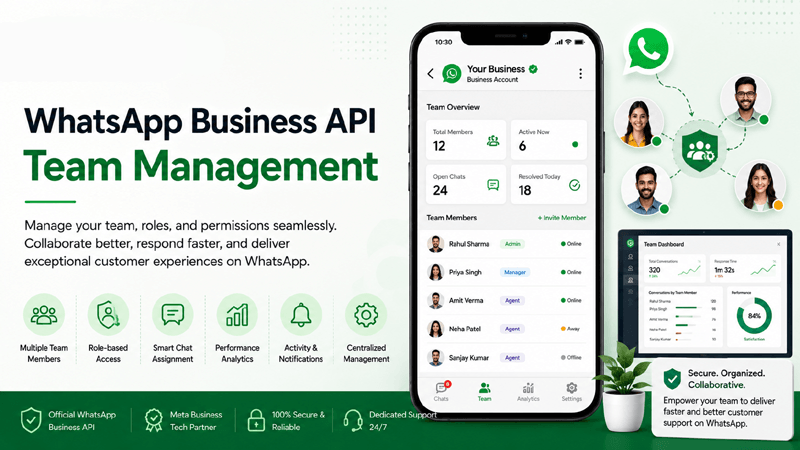
What is WhatsApp Business API Team Management?
A WhatsApp Business API Team Management workflow refers to the administration of multiple human operators interacting with customers through a single verified enterprise phone number. Unlike standard mobile applications restricted to single devices, enterprise platforms like QuickMessage allow organizations to provision unlimited agents, assign specialized roles, route conversations intelligently, and monitor performance securely.
Why Businesses Need Multi-Agent Architecture
As enterprise inbound volume scales, relying on individual mobile handsets creates severe operational bottlenecks, missed inquiries, and zero accountability. Implementing structured Shared Team Inbox protocols ensures that every client interaction receives prompt attention. Departments can seamlessly transition from manual chat handoffs to automated routing workflows using our advanced Flow Builder capabilities.
How It Improves Inter-Departmental Collaboration
Modern enterprise growth requires tight synchronization between sales, billing, and technical support. Multi-agent architecture enables internal notes, mention tags, and context-rich conversation history sharing. When a customer reaches out via the WhatsApp Business API, relevant data points sync automatically via native CRM Integrations, equipping operators to deliver personalized, rapid resolutions.
Why Team Management Matters for Enterprises
Discover how multi-agent collaboration elevates brand accountability, agent productivity, and customer satisfaction.
Customer Support Excellence
Deliver exceptional resolution speeds by organizing support representatives into dedicated queues connected directly to your official WhatsApp Business API number.
Sales Collaboration
Enable account executives to collaborate on high-value inbound leads, run coordinated outreach via Campaign Management, and close deals faster.
Faster Response Times
Drastically reduce first response times (FRT) by distributing incoming user inquiries evenly across active agents with intelligent load balancing.
Internal Coordination
Use private internal notes to discuss client cases without switching applications, ensuring unified messaging before replying to customers.
Clear Accountability
Track individual agent output, resolution metrics, and customer ratings using detailed Analytics Reports for complete managerial oversight.
Unmatched Productivity
Empower staff with quick reply Templates and rich media from your centralized Media Library to handle chats efficiently.
Enterprise Team Management Features
Explore the comprehensive toolset designed to power secure, scalable, and seamless multi-agent workflows.
Shared Team Inbox
Centralize all incoming customer communications into a single, collaborative Shared Team Inbox.
Unlimited Team Members
Scale your workforce effortlessly by onboarding as many support and sales agents as your business requires.
Role Based Access
Assign granular permissions (Admin, Supervisor, Agent) to secure sensitive client data and administrative settings.
Conversation Assignment
Manually or automatically route chats to specific team members based on expertise, language, or department.
Internal Notes
Leave private comments within chat threads visible exclusively to internal staff for contextual handoffs.
Agent Routing
Deploy smart round-robin distribution rules to balance workloads evenly across your customer support team.
CRM Integration
Sync contact records and interaction logs directly into your database using native CRM Integrations.
Campaign Management
Coordinate outbound messaging initiatives and broadcast campaigns collaboratively via Campaign Management tools.
Flow Builder Automation
Design automated pre-chat qualification trees using our intuitive drag-and-drop Flow Builder.
Media Sharing
Dispatch images, videos, and documents instantly by pulling approved assets from your Media Library.
Analytics Reports
Monitor team KPIs, response velocity, and ticket resolution volumes using detailed Analytics Reports.
Team Performance
Evaluate individual operator efficiency and customer feedback ratings to optimize ongoing workforce training.
How WhatsApp Team Management Works
Follow the seamless, automated journey of multi-agent collaboration from inbound message to successful resolution.
Customer Message Received
An inbound query arrives on your official WhatsApp Business API number and enters the centralized queue.
Assign Conversation
The chat is assigned automatically via routing rules or manually allocated to an available agent in the shared inbox.
Agent Responds
The assigned operator engages the customer using verified Templates and saved media assets.
Internal Collaboration
Staff leave private notes and consult colleagues to resolve complex cases without disrupting the client experience.
Resolve Customer Query
The issue is successfully settled, and the conversation thread is marked closed or archived for future reference.
Track Performance
Supervisors review interaction duration and CSAT ratings via automated Analytics Reports.
Enterprise and Customer Benefits
Discover how multi-agent collaboration drives structural efficiency for enterprises while delivering effortless interactions for consumers.
Business Benefits
- Scalable Operations: Easily manage thousands of daily inbound chats by distributing workloads across dozens of specialized team members.
- Eliminate Silos: Unify communication channels so sales and support teams share complete visibility over customer accounts.
- Data-Driven Insights: Leverage precise metrics to identify peak hours, agent workloads, and performance trends instantly.
- Enterprise Security: Protect brand assets with role-based access controls and encrypted communication channels.
Customer Benefits
- Zero Wait Times: Experience rapid acknowledgments and immediate routing to qualified subject matter experts.
- Consistent Messaging: Never repeat context when transferred between departments thanks to synchronized chat history.
- Familiar Experience: Interact effortlessly over mobile chat without navigating complex web portals or phone trees.
- Guaranteed Resolution: Enjoy accountable support where every query is tracked until full completion.
Industry Use Cases for Team Management
See how diverse market sectors utilize multi-agent collaboration to streamline customer engagement and operational workflows.
Education
Manage admissions counseling and student inquiries across multiple department desks.
Healthcare
Coordinate patient appointment scheduling and triage queries securely.
Retail
Handle inventory checks and store locator requests with rapid agent dispatch.
Ecommerce
Resolve shipping tracking and return requests instantly using shared shift rosters.
Finance
Direct account verification and advisory chats to licensed financial representatives.
Insurance
Process policy claims routing and renewal inquiries with strict audit trails.
Travel
Assist travelers with booking modifications and emergency itinerary support.
Hospitality
Coordinate concierge services and guest feedback across shift handovers.
Real Estate
Assign property viewing leads to regional brokers based on geographic territory.
Automotive
Schedule test drives and service bay appointments with designated advisors.
Telecom
Troubleshoot technical connectivity issues and billing queries collaboratively.
Government
Deliver citizen service desk inquiries to authorized administrative personnel.
Why Choose QuickMessage
Enterprise infrastructure built for uptime, performance, and complete security compliance.
Frequently Asked Questions
Expert guidance on implementing shared team inboxes, multi-agent access, and conversation assignment.
What is a shared inbox in WhatsApp team management?
A shared inbox consolidates all incoming customer messages sent to your official WhatsApp number into a single workspace. Multiple support agents can view, assign, and respond to inquiries simultaneously without logging into separate devices. This centralized approach eliminates missed messages, prevents duplicate replies, and ensures seamless continuity across shift handovers, transforming standard messaging into an organized enterprise customer service platform.
How many agents can access the WhatsApp Business API?
Unlike the standard free mobile application which limits multi-device logins to a handful of companion phones, the official API supports unlimited team members. Platforms like QuickMessage allow you to provision hundreds of distinct operator accounts, assign specific departmental queues, and scale your customer service or sales teams infinitely as your enterprise grows, all while maintaining complete administrative oversight and security.
Is agent communication secure and compliant with privacy standards?
Security is paramount in enterprise communications. QuickMessage implements end-to-end encryption across all chat transmissions and enforces strict role-based access controls. Administrators can restrict agent permissions, view comprehensive audit logs, and ensure that customer data complies fully with global regulatory frameworks such as GDPR and CCPA, protecting sensitive client records from unauthorized exposure.
How does CRM integration enhance multi-agent workflows?
Native CRM integrations connect your customer database directly to the shared inbox interface. When an agent opens a chat, customer profile details, past order history, and previous support tickets populate automatically on the sidebar. This eliminates the need for agents to switch between separate software tabs, enabling them to deliver contextual, personalized responses and update client records instantly without manual data entry errors.
Can chat automation work alongside human support agents?
Yes, automated workflows and human agents operate in perfect harmony. Using our visual flow builder, automated bots handle initial greetings, answer frequently asked questions, and qualify leads 24/7. When an inquiry requires complex problem-solving or high-touch negotiation, the system performs a seamless handoff, routing the conversation directly to an available human operator in the shared team inbox with complete chat history intact.
What metrics are tracked in team performance analytics?
Advanced analytics reporting tracks key performance indicators including average first response time (FRT), mean resolution time, total inbound volume per agent, conversation status breakdowns, and customer satisfaction (CSAT) feedback scores. Supervisors use these comprehensive dashboards to evaluate individual productivity, identify training opportunities, and optimize staffing schedules to meet peak inbound demand efficiently.
How does conversation assignment work among team members?
Conversation assignment can be executed manually by supervisors or automated using round-robin distribution rules and keyword triggers. Chats can be segmented into queues dedicated to billing, technical support, or sales. Agents can also tag peers, reassign threads based on specialized expertise, or claim unassigned incoming messages directly from the master queue, ensuring optimal load balancing across the active workforce.
Are team management features included in standard pricing plans?
QuickMessage structures its pricing tiers to accommodate organizations of all sizes, scaling from growing businesses to massive multinational enterprises. Core team collaboration tools, shared inbox capabilities, and multi-agent seating are integrated seamlessly into our service packages. Detailed pricing breakdowns and feature matrices are available on our dedicated pricing page to help you select the ideal tier.
How do internal notes improve team communication?
Internal notes allow agents to attach private comments directly to a customer conversation thread. These notes are completely invisible to the end consumer. Support staff use them to summarize account issues, ask managers for approval on discounts, or brief colleagues during shift handovers. This keeps all relevant context anchored inside the specific chat record, preventing miscommunication across departments.
Can supervisors monitor active agent chats in real time?
Supervisors enjoy full visibility over all active operational threads within the platform. They can audit ongoing conversations, monitor response speeds, review internal notes, and intervene or take over chats whenever necessary. This real-time supervision ensures strict adherence to brand communication guidelines and allows managers to provide immediate guidance during challenging support interactions.
What are the benefits of using pre-approved message templates?
Pre-approved message templates enable agents to initiate conversations or send structured notifications outside the standard 24-hour customer service window in full compliance with Meta guidelines. Using standardized templates ensures brand consistency, eliminates typos, speeds up repetitive responses, and maintains compliance across all outbound communications sent by your support and sales teams.
How do custom role permissions protect business operations?
Role-based access control allows administrators to define exactly what actions each employee can perform. For example, junior support agents can be granted permission to reply to chats without access to billing settings, API keys, or campaign broadcasting tools. This granular restriction prevents accidental system modifications, protects confidential customer records, and maintains strict operational security across the platform.
Can agents share rich media files with customers easily?
Yes, agents have direct access to a centralized media library containing pre-approved images, PDF product brochures, instructional videos, and audio files. Operators can attach these rich media assets to chat threads with a single click, enriching the customer support experience and providing immediate visual answers without requiring manual file uploads from individual desktop folders.
How does campaign management integrate with team workflows?
Outbound marketing campaigns and promotional broadcasts generate immediate inbound replies from interested prospects. QuickMessage links campaign dispatch modules directly to your shared team inbox, ensuring that incoming responses are categorized, assigned to sales agents, and managed systematically. This prevents broadcast replies from getting lost and accelerates lead conversion rates significantly.
What support is available during team onboarding and setup?
QuickMessage provides dedicated technical support and onboarding assistance to help enterprises configure team hierarchies, role permissions, and routing rules smoothly. Our customer success team ensures your technical infrastructure integrates seamlessly with your existing CRM and communication workflows, minimizing deployment friction and accelerating time-to-value for your entire organization.
Ready to Revolutionize Your Team Collaboration?
Join hundreds of high-growth enterprise teams using QuickMessage to streamline support, empower agents, and scale customer engagement effortlessly.


